
HVAC Estimate Software and Invoice Workflow
How HVAC contractors build clear estimates for repairs and installs, then turn approved work into invoices without rewriting the job.
by Eng. José Manuel Siso Colmenares • 7/19/2026 · Updated: 10/29/2026
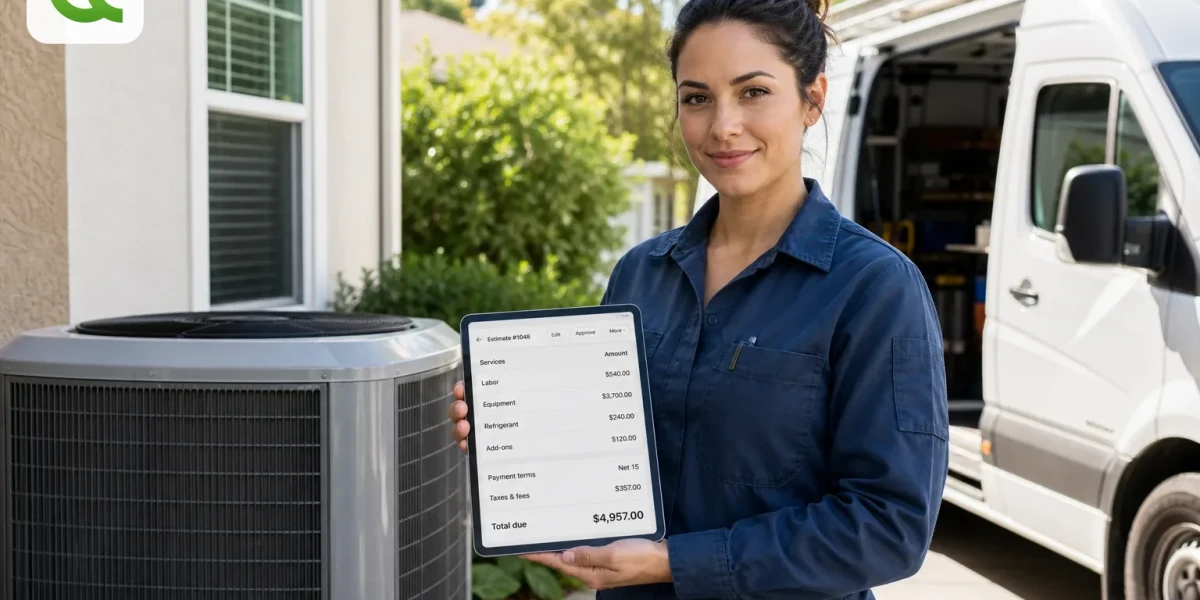
HVAC Estimate Software and Invoice Workflow
Updated: October 29, 2026.
Your customer does not wake up wanting an invoice. They want cool air, heat that works, or a system they can trust through the next season. Your job is to turn that need into a price they understand; and a bill that matches what they already approved.
That is what HVAC estimate software is for. Not a fancier PDF. A workflow that follows the job from the first service call to the final invoice.
How do you price HVAC work in enough detail to protect your margin, without making the customer feel like they need an engineering degree to say yes?
This guide walks through that path for service calls, repairs, replacements, maintenance, add-ons, payment terms, and billing.
Quick answer: Good HVAC estimate software prices labor, equipment, materials, refrigerant, permits, warranty notes, and add-ons → then turns the approved estimate into an invoice without retyping the job.
What you will take away:
- Why a generic invoice app falls short on HVAC jobs
- The five cost buckets every HVAC estimate should show
- Separate workflows for repairs, replacements, and maintenance
- A live QuickAdmin demo: heat pump estimate → invoice (with screenshots)
- How to convert approved work into a clean invoice without rewriting the job
Why HVAC pricing feels different
From the driveway, the story is simple: the AC is not cooling, the furnace will not fire, or the system is old and noisy. From your side of the truck, the variables stack up fast; diagnosis time, system age, attic access, tonnage, duct condition, refrigerant type, electrical, drain lines, code, warranty limits, permits, return trips, and whether this call landed in the middle of a heat wave.
Customers are also weighing comfort against energy cost. The U.S. Bureau of Labor Statistics projects employment for HVAC mechanics and installers to grow 8 percent from 2024 to 2034; faster than average. ENERGY STAR notes that the average household spends more than $2,200 a year on energy bills, with nearly half going to heating and cooling. People ask hard questions about price because the bill sits next to comfort and monthly utility spend.
So the estimate has to do two jobs at once: protect your margin and give the customer a clear reason to approve.
A simple HVAC framework: diagnose, explain, price, approve, invoice
| Stage | What you do | What the customer needs |
|---|---|---|
| Diagnose | Inspect the system, access, and failure point | A plain-English explanation |
| Explain | Repair vs. replace, and what each option covers | Confidence in the scope |
| Price | Labor, equipment, materials, terms | A transparent total |
| Approve | Send the estimate and collect the yes | An easy decision |
| Invoice | Convert approved work into the bill | A payment request that matches the yes |
If the estimate already looks like the invoice, collection gets easier.
What HVAC estimate software should help you price
Labor
Diagnostic visit, travel, inspection, removal, installation, electrical connection, line set work, drain work, thermostat setup, startup and testing, warranty registration, return trips, after-hours calls, and helper time.
| Labor item | Quantity | Rate | Total |
|---|---|---|---|
| Diagnostic visit | 1 | $125 | $125 |
| Lead technician labor | 3 hours | $115 | $345 |
| Helper labor | 3 hours | $65 | $195 |
| System test and startup | 1 | $95 | $95 |
Equipment
Condenser, air handler, furnace, heat pump, evaporator coil, mini splits, thermostat, zone control, humidifier, air purifier, drain pump; whatever the job actually needs.
| Equipment | Quantity | Total |
|---|---|---|
| 3 ton heat pump condenser | 1 | $3,250 |
| Matching air handler | 1 | $2,100 |
| Smart thermostat | 1 | $245 |
Materials
Line set, disconnect, whip, pad, float switch, drain line, PVC and copper fittings, nitrogen, refrigerant, filter drier, duct transitions, mastic, tape, hangers, fasteners, sealant, insulation.
Refrigerant
Recharge system with up to 2 lbs refrigerant after approved repair. Additional refrigerant or leak repair outside this scope needs separate approval.Permits and code-related items
Permit and inspection fees, electrical corrections, condensate drain fixes, equipment stands, tie-downs, safety shutoffs, duct corrections, and access corrections when they apply.
Warranty notes
Manufacturer warranty follows manufacturer terms. Labor warranty covers only the work listed on this estimate and invoice.HVAC estimate template you can copy
HVAC ESTIMATE

Contractor:
Company name / address / phone / email / license / website

Client:
Name / billing address / phone / email

Job:
Job address / unit / system location
Estimate number / date / valid until / prepared by

System:
Type / brand / model / serial / age / capacity / refrigerant / service issue

Scope of work:
Diagnosis, repair, replacement, or install; written clearly

Labor:
Diagnostic fee / tech labor / helper / after hours / startup

Equipment:
Item / model / quantity / price

Materials:
Line set / drain / electrical / refrigerant / duct / small materials

Permits and fees:
Permit / inspection / disposal / delivery

Add-ons and exclusions:
Approved / pending / excluded work

Payment terms:
Deposit / balance / Net terms / how to pay

Totals:
Subtotal / tax / discount / total
Three HVAC workflows that should not share one template
Service call and repair: no-cool or no-heat calls, capacitors, contactors, thermostats, drain clogs, low refrigerant, fan or blower motors, basic electrical.
Equipment replacement: condenser, air handler, furnace, heat pump, full system, mini split, package unit.
Maintenance agreement: seasonal tune-ups, residential or commercial plans, filter service, coil cleaning, multi-unit routes, property manager work.
A $425 repair and a $9,000 replacement are different businesses. Price them like it.
Follow a real HVAC replacement in QuickAdmin
This is a real job-based estimate from the QuickAdmin demo account → job HVAC Heat Pump Replacement Demo, customer Taylor Demo, Orlando FL.
Estimate title: 3 Ton Heat Pump Replacement | Labor and Equipment
Terms note: 40% deposit before equipment order (balance due upon completion) valid 15 days
Estimate total: $7,155.00
Linked invoice: INV-00504 (linked to EST #636)
The screenshots below follow the same replacement from estimate to released invoice. Equipment, labor, materials, customer details, and totals stay attached to one job throughout the process.
Step 1: Find the replacement estimate
Filter the estimates list to HVAC Heat Pump Replacement Demo. Before opening the record, you can already see the customer, pending status, and $7,155 total.
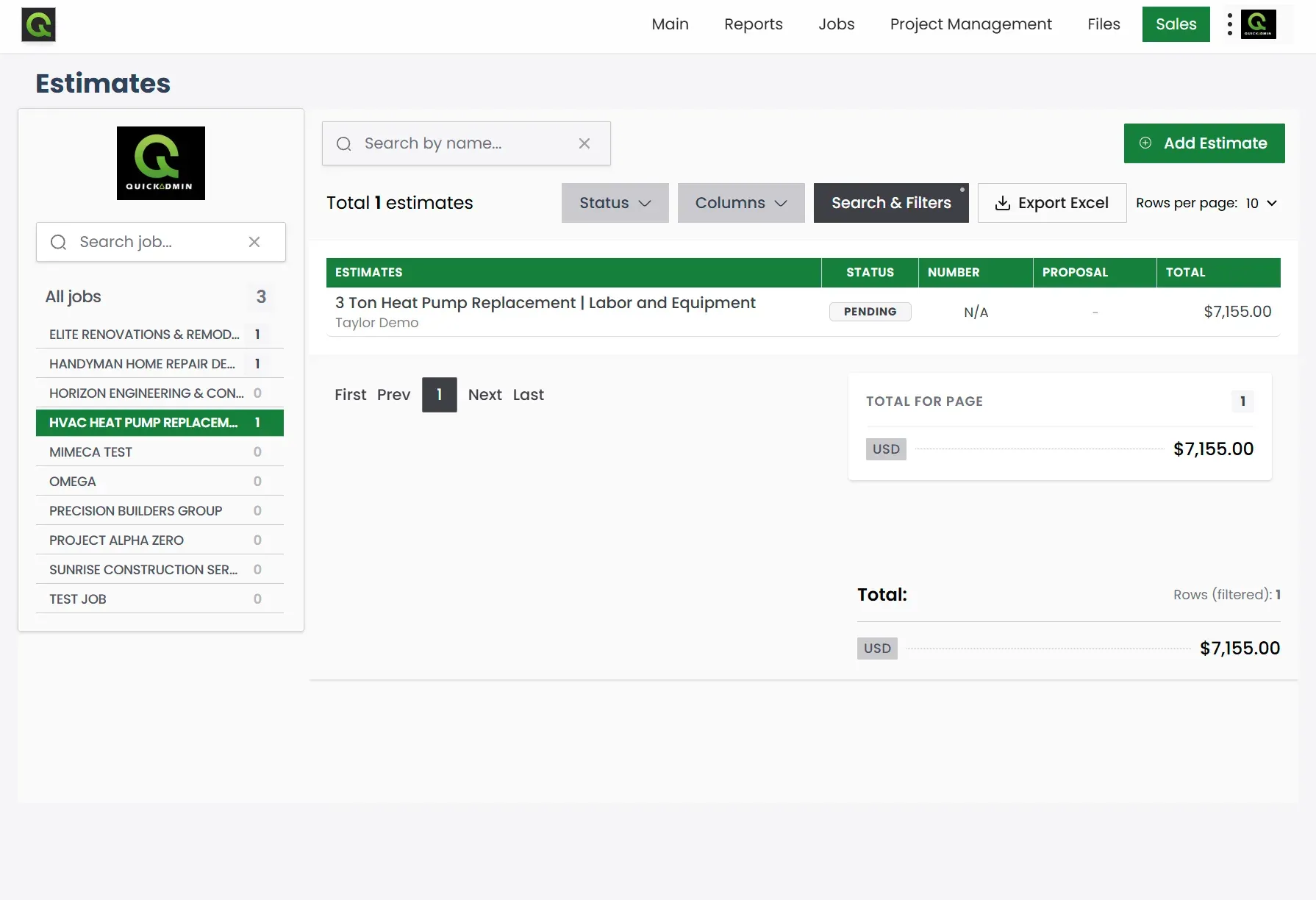
That gives the office and field team a shared starting point. Nobody has to ask which attachment contains the latest number.
Step 2: Build the scope and price the work
Start with a scope the homeowner can understand:
Remove existing outdoor condenser and indoor air handler. Install new matched 3 ton heat pump system, reconnect existing duct transition where possible, install new equipment pad, reconnect electrical whip and disconnect where reusable, complete startup, test heating and cooling modes, and remove old equipment from the jobsite.
Exclusions: duct replacement, major electrical panel work, drywall repair, structural modification, crane service, hidden code corrections, and work not listed in the approved scope.
Then separate equipment, labor, and materials:
| Item | Qty | Rate | Total |
|---|---|---|---|
| 3 ton heat pump condenser | 1 | $3,250 | $3,250 |
| Matching air handler | 1 | $2,100 | $2,100 |
| Installation labor (remove old unit, set new system, startup) | 12 | $115 | $1,380 |
| Line set, pad, disconnect, and startup materials | 1 | $425 | $425 |
Estimate total: $7,155.00
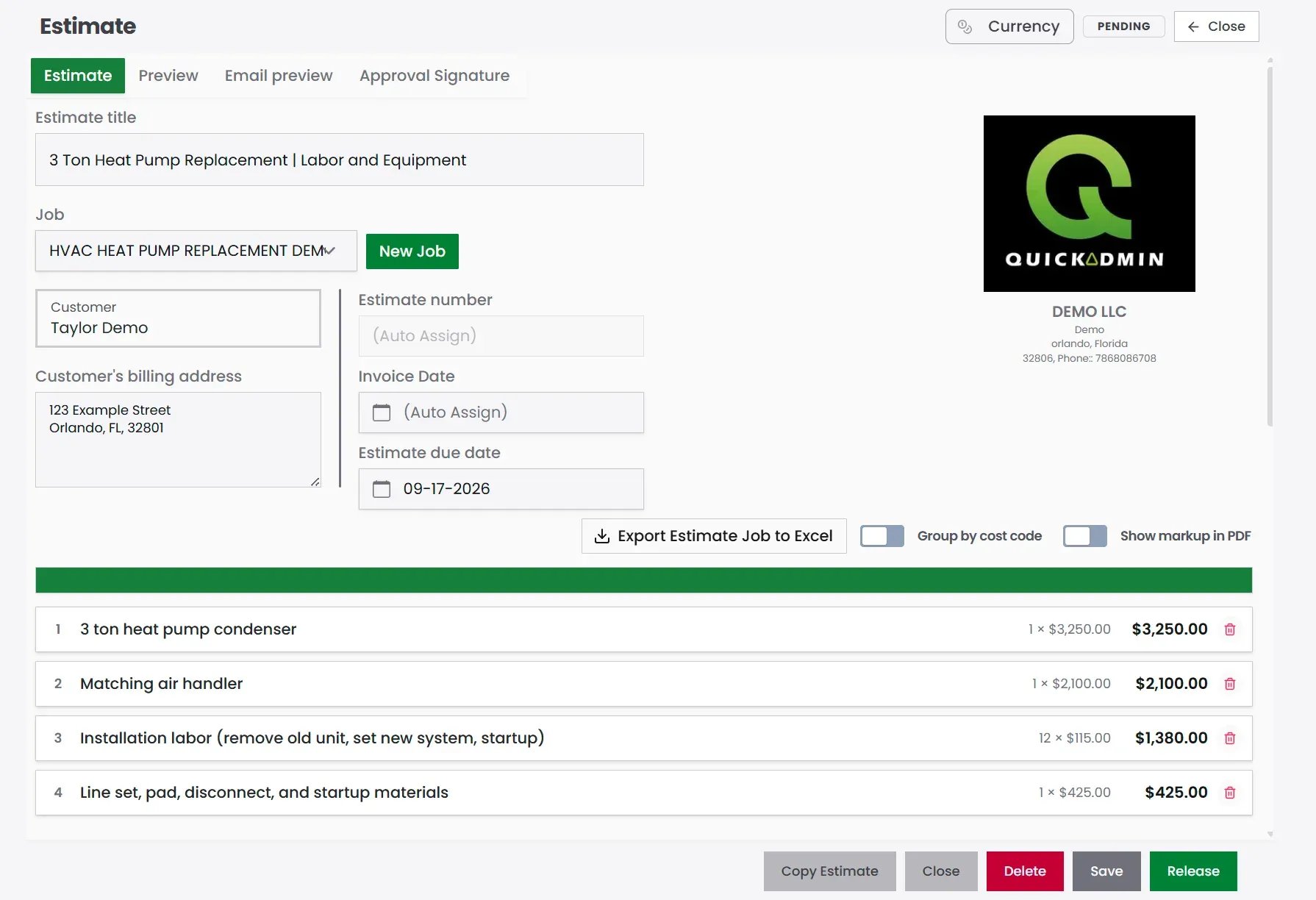
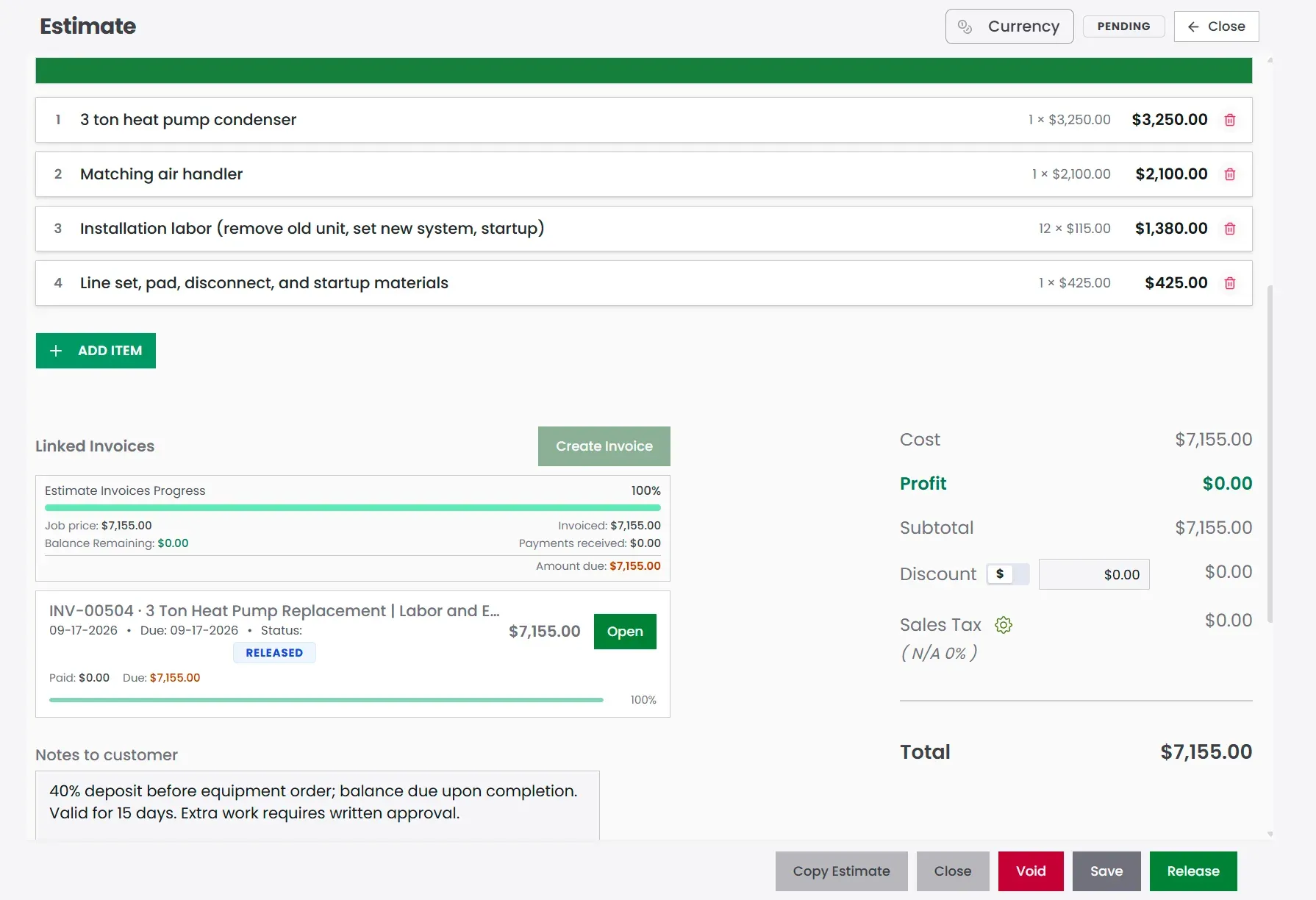
The screen makes the price easier to explain: $5,350 for the matched equipment, $1,380 for installation labor, and $425 for the line set, pad, disconnect, and startup materials. The customer sees what drives the total instead of one unexplained lump sum.
Step 3: Review the estimate as the customer will see it
The editing screen is for building the estimate. Preview is where you check the document the customer will receive: company details, Bill To, due date, scope, line items, and price.
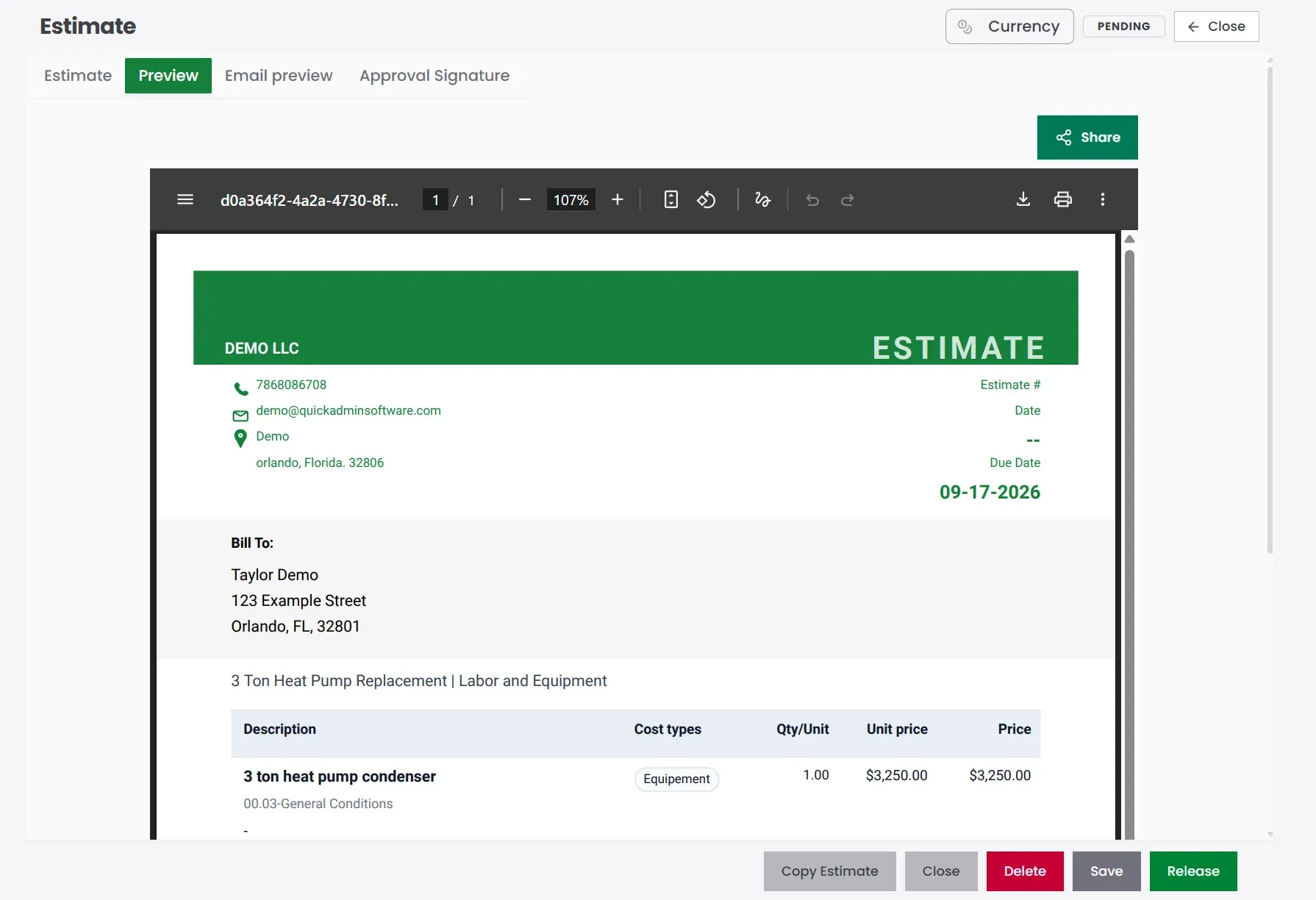
For a replacement job, this is also the moment to confirm that equipment capacity, exclusions, warranty language, deposit terms, and estimate validity are clear.
A practical pricing formula
HVAC replacement estimate =
equipment
+ installation labor
+ materials / pad / line set
+ permits (when required)
+ disposal / startup
+ overhead
+ profit
+ approved add-ons
Step 4: Convert the approved estimate without rewriting it
Once the estimate is approved, keep working from the same job. The shared contractor estimating software workflow shows how estimates, change orders, invoices, and job costs stay connected.
- Create the job (client + address).
- Build the estimate inside that job.
- Add system details and a clear scope.
- Price labor, equipment, and materials.
- Add exclusions and warranty notes before anyone signs.
- Send and get approval.
- Do the work.
- Record approved add-ons.
- Convert the estimate into an invoice (the demo invoice stays linked to EST #636).
- Track payment; and sync to QuickBooks Online when you need it.
The progress view confirms that 100% of the $7,155 estimate has been invoiced and identifies the linked invoice as INV-00504.
Job naming that helps later
Examples that stay searchable: “Smith no cool repair,” “Oak Street heat pump replacement,” “Building B seasonal maintenance,” “Restaurant RTU repair,” “Mini split install; garage apartment,” “PM AC service Unit 204.”
Write the line item like a technician, not a cashier
Weak: AC work
Better: Replace failed dual run capacitor and test condenser operation
Exclusions that save phone calls later
Call out duct replacement, panel upgrades, drywall, structural work, crane service, hidden code corrections, extra refrigerant, drain line replacement, thermostat replacement, and maintenance plans unless they are already on the estimate.
Step 5: Confirm the invoice matches the estimate
Once the estimate is converted, the job invoice keeps the same equipment and labor lines so the bill matches what the customer already approved.
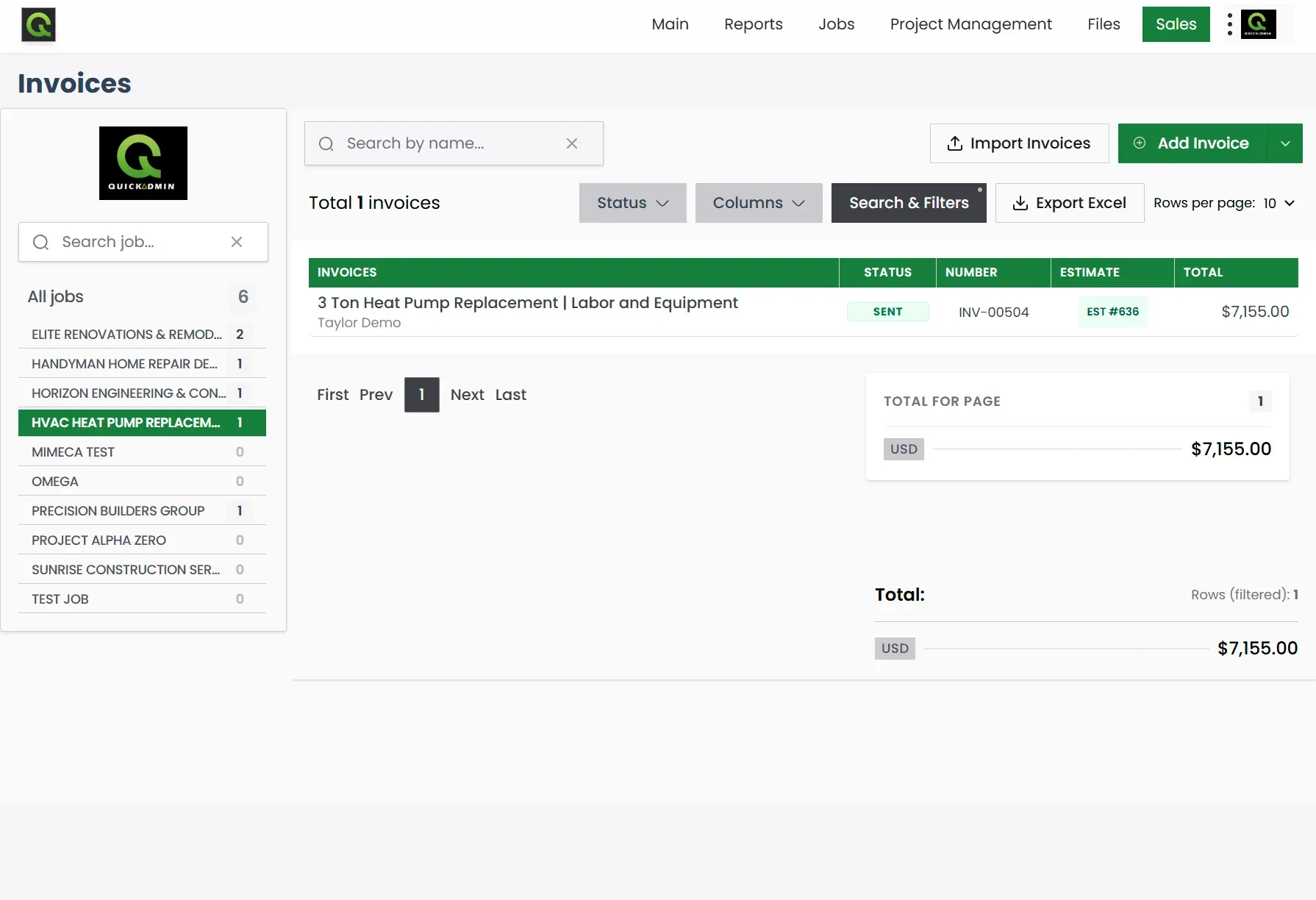
The invoices list shows INV-00504, its connection to EST #636, the customer, status, and $7,155 total. That link is useful when a customer asks whether the bill matches the quote.
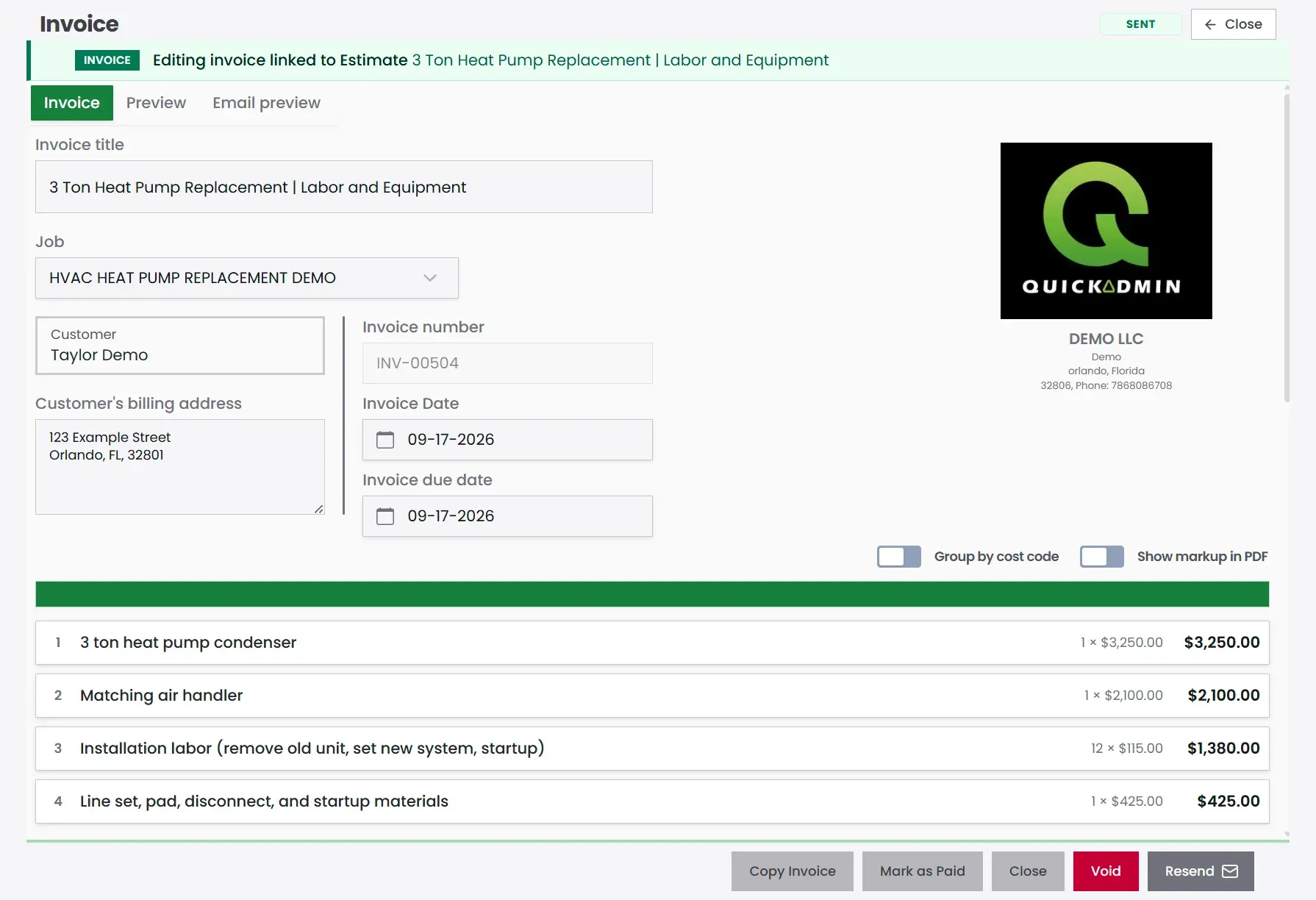
Inside the invoice, the condenser, air handler, installation labor, and materials carry over with the same quantities and rates. There is no second round of data entry and less opportunity for a mismatch.
Always show when and where:
Job: HVAC Heat Pump Replacement Demo
Bill to: Taylor Demo; 123 Example Street, Orlando, FL 32801
Invoice #: INV-00504 · Due date: on the invoice
Show equipment details for replacements:
| Equipment | Detail | Amount |
|---|---|---|
| Heat pump condenser | 3 ton | $3,250 |
| Air handler | Matching | $2,100 |
Break out approved add-ons so nobody argues about “what was included”:
| Approved add-on | Amount |
|---|---|
| Replace damaged disconnect box | $285 |
| Add float switch (customer request) | $175 |
| Replace thermostat | $245 |
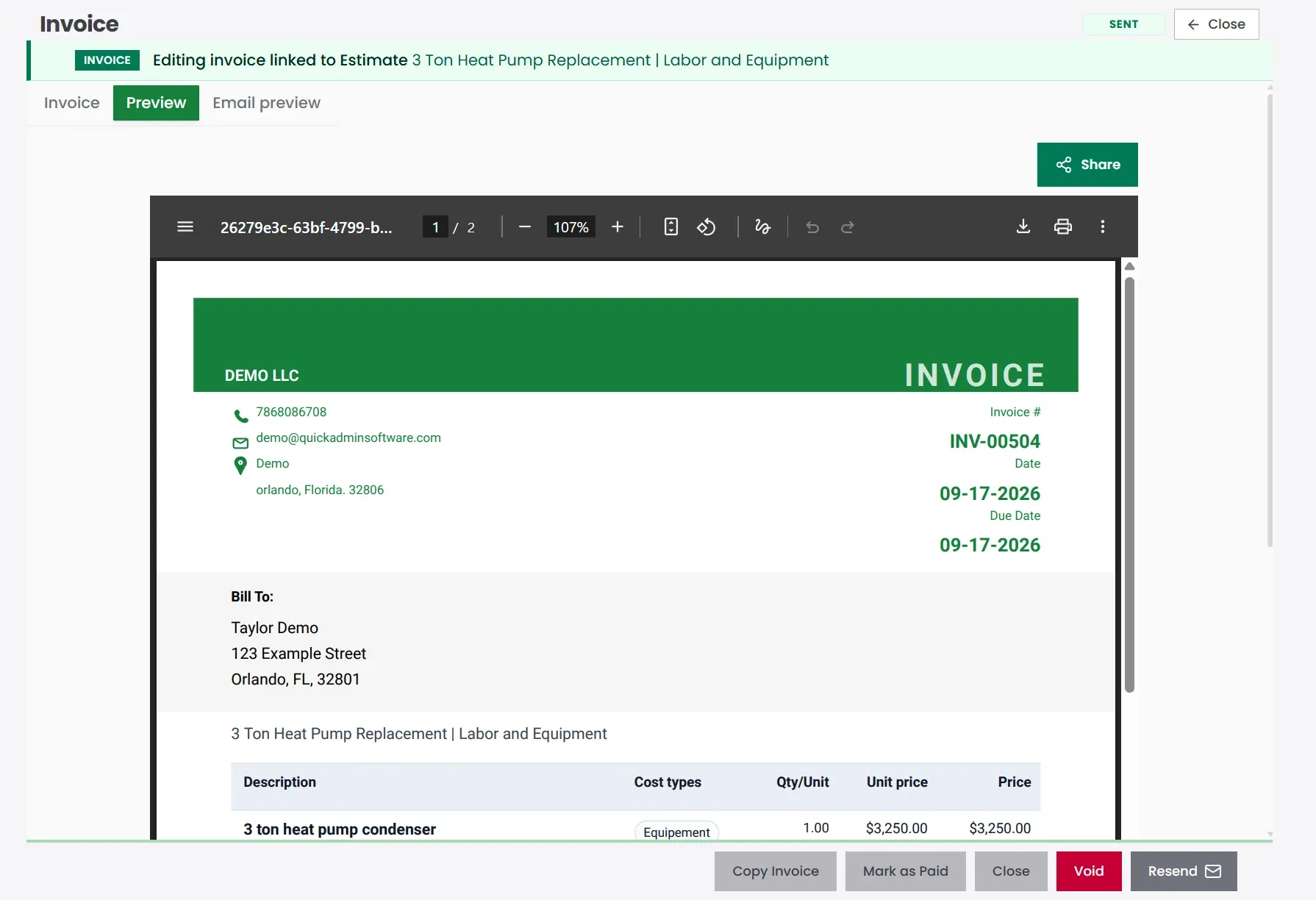
The PDF preview is the final check before collection: invoice number, dates, Bill To information, job title, equipment, labor, materials, and amount due should all agree with the approved estimate.
Payment terms by job type
| Job type | Suggested terms |
|---|---|
| Diagnostic visit | Due Upon Receipt |
| Small repair | Due Upon Receipt or Net 7 |
| Emergency service | Due Upon Receipt |
| Equipment replacement | Deposit + balance on completion |
| Commercial service | Net 15 or Net 30 if approved |
| Maintenance agreement | Monthly, quarterly, or annual |
| Property manager work | Net 7 or Net 15 |
Deposit example for replacements:
| Milestone | Payment |
|---|---|
| Deposit before equipment order | 40% |
| Balance due upon completion | 60% |
Payment is due upon receipt unless different terms were approved in writing.This estimate is valid for 15 days. Equipment pricing and availability may change after that.How QuickAdmin fits an HVAC day
| Stage | In QuickAdmin | Result |
|---|---|---|
| Service request | Create job | Client and address stay with the work |
| Diagnosis | Notes and system details | Field info does not live only in a text thread |
| Estimate | Labor, equipment, materials | Scope is priced in one place |
| Approval | Send estimate | Customer reviews before you order gear |
| Field work | Files and approved add-ons | Changes are documented |
| Billing | Convert estimate to invoice | No duplicate typing |
| Payment | Track status | You know what is still open |
| Accounting | QuickBooks Online sync | Books stay cleaner |
Compared with a basic invoice app or a spreadsheet, the difference is the job spine: estimate, add-ons, invoice, and payment stay attached to the same customer and address instead of living in three different files.
Mistakes that quietly erase HVAC margin
Skipping the diagnostic fee. Travel, testing, and expertise are not free. Put them on the page: Diagnostic visit and system inspection: $125.
Hiding equipment details. On replacements, name the system and what is being installed. Vague lines invite callbacks.
Forgetting small materials. Whips, disconnects, pads, fittings, sealant, and fasteners add up. If they are not on the estimate, they come out of profit.
No exclusions. A replacement quote that never mentions ductwork, drywall, or major electrical work is an argument waiting to happen.
Undocumented “while you’re here” work. If they approved it, add it to the job before you invoice.
One template for every job. Service, replacement, and maintenance need different shapes.
Clauses worth keeping on file
Equipment selection is subject to supplier availability at the time of approval and deposit.This estimate includes only the work listed above. Duct replacement, major electrical work, drywall repair, structural modification, and hidden code corrections are excluded unless listed separately.Additional work not included in the approved scope may require separate approval before scheduling or billing.Maintenance service includes only the inspection and service items listed. Repairs, replacement parts, refrigerant, and after-hours service are billed separately unless included.Related contractor guides
- Contractor estimating software
- How to Make an Invoice
- Why PWA billing and estimating is the future
- Job Costing Software for Small Contractors
- Purchase Order Software for Contractors
- Construction Change Order Template 2026
Bottom line
An HVAC estimate should make the invoice feel expected; not surprising. When the customer already saw the diagnosis, equipment, labor, exclusions, and terms, paying the bill is just the last step of a conversation you already finished.
With QuickAdmin, you can create the job, build the estimate, document notes and add-ons, convert approved work into an invoice, track payment, and keep QuickBooks Online in the loop; so your techs stay in the field and your paperwork stays tied to the work.
HVAC estimate worksheet and scope check
Use separate templates for repairs and replacements. Identify the equipment allowance, removal, connections, access, startup, and handover.
An equipment quote is only one input. Record the installation scope and commissioning allowance as their own cost assumptions.
Worked cost example you can download
This fictional calculation demonstrates the structure, not local market rates or a completed customer project. Replace the quantities, supplier allowances, and loaded labor cost with your own inputs. Tax is excluded from this example.
| Cost item | Quantity | Unit cost | Extended cost |
|---|---|---|---|
| Equipment allowance | 1 lot | $2,400.00 | $2,400.00 |
| Connections and consumables allowance | 1 lot | $400.00 | $400.00 |
| Installation labor | 16 person hour | $50.00 | $800.00 |
| Removal allowance | 1 lot | $200.00 | $200.00 |
| Startup and handover allowance | 2 person hour | $50.00 | $100.00 |
Direct cost is $3,900.00. An illustrative 10% overhead allocation adds $390.00, producing a cost basis of $4,290.00. For a target margin of 20%, divide that cost basis by 0.80: the illustrative selling price is $5,362.50 before tax. A 20% markup would produce a lower margin of about 16.7%.
Download the hvac estimate example CSV. Cost rows and summary rows are labeled separately. Recalculate after replacing the inputs; the file contains example values rather than an automatic pricing system.
Match the plan to the workflow
QuickAdmin Free currently includes 6 estimates and 3 invoices per month, one user, and two jobs. Basic adds unlimited estimates and invoices, integrated payments, and overdue reminders. Advanced adds time and shift management and photos and documents. Premium adds change orders, purchase orders, estimate budgets, per job bills and expenses, and QuickBooks invoice synchronization. Confirm the current plan limits before choosing.
Use construction guides by trade for related project scopes, the contractor financial workflow for shared cost control, and compare estimated and actual job costs for the next step. Keep the original scope, approved changes, and prior payments distinguishable when preparing the final invoice.
Free tools for the HVAC cost calculation
Check the labor and travel cost behind your repair or replacement before converting the cost basis into a selling price.
- True labor cost calculator: Include wages, additional labor costs, and nonbillable time in your estimate.
- Trip charge advisor: Estimate travel distance, drive time, and a charge to review for the visit.
- Profit margin calculator: Compare markup and margin using your cost and selling price.
These are separate web tools. Review the inputs and any AI suggestions before using the result in an estimate or invoice. Browse the full tools library for other contractor calculations.
FAQ
What is HVAC estimate software?
It is software that helps you price diagnostics, repairs, installs, labor, equipment, materials, refrigerant, permits, add-ons, and payment terms in one organized workflow → then turn the approved estimate into an invoice.
What should an HVAC estimate include?
Client details, job address, system type, diagnosis or scope, equipment, labor, materials, permits when needed, warranty notes, exclusions, payment terms, and estimate validity.
How do HVAC contractors turn estimates into invoices?
Create the job, build the estimate inside it, get approval, finish the work, document approved add-ons, then convert the estimate into an invoice without rewriting the job.
What payment terms should HVAC contractors use?
Due Upon Receipt or Net 7 for small repairs. For larger replacements, a deposit before ordering equipment and the balance due at completion.
Can QuickAdmin create HVAC estimates and invoices?
Yes. QuickAdmin supports job-based estimates, labor and equipment line items, add-ons, estimate-to-invoice conversion, payment tracking, and QuickBooks Online sync.
Should HVAC invoices show equipment model details?
Yes; type, model and serial when available, plus labor, materials, warranty notes, service date, job address, payment terms, and approved extras.
Should HVAC contractors charge a diagnostic fee?
Yes. It covers travel, technician time, testing, tools, and the work required to identify the issue before repair pricing.
Does QuickAdmin integrate with QuickBooks?
Yes. QuickAdmin integrates with QuickBooks Online to keep invoices and accounting workflows connected.