
Invoice: How to Make an Invoice
Learn how to make an invoice clients pay fast. Use a simple template, avoid common mistakes, and send invoices from your phone with QuickAdmin.
by QuickAdmin Team • 12/21/2025


Invoice: How to Make an Invoice
Updated: December 21, 2025
You already know how to do the work.
The part that quietly kills your time (and cash flow) is what happens after the work: writing the invoice, sending it, then chasing it.
Here’s the open question I want you to keep in the back of your mind: why do two invoices for the same job get totally different results, one paid in two days and the other ignored for two weeks?
By the end, you’ll have a repeatable way to build invoices that get approved faster, plus the follow up message that consistently gets a reply.
The problem and the opportunity
When invoices are late, it rarely feels like a “finance issue.” It feels like:
- You are fronting materials.
- You are paying labor before you get paid.
- You are losing hours in awkward follow ups.
QuickBooks’ US Small Business Late Payments Report 2025 found 56% of US small businesses surveyed are owed money from unpaid invoices, averaging $17.5K, and 47% reported some invoices overdue by more than 30 days. QuickBooks report
That’s the opportunity: if your invoice is clearer, easier to approve, and easier to pay, you get your cash faster without begging.
A short story you might recognize
You finish a small job, take photos, text the client “all done,” and head to the next site.
Later that night, you open a blank document and try to remember:
- What exactly did we install?
- Which materials did we use?
- Did we include disposal?
- Was there a change request?
That invoice turns into a rushed summary. The client has questions. Approval slows down. Payment slows down.
💡 The real goal is not “make an invoice.” The real goal is “make an invoice that needs zero clarification.”
The deep solution (QuickAdmin as the example)
This guide works whether you invoice in Word, Excel, a mobile app, or a full accounting system.
But to keep it practical, I’ll show the workflow using QuickAdminSoftware, because it’s built around the exact contractor problem: creating estimates and invoices fast, then tracking what is pending, viewed, or overdue.
QuickAdmin’s site lists a Free Plan with limits like Invoices 3 per month, Estimates 6 per month, plus bills tracking and Home Depot price consulting, and an AI powered invoice generator with voice dictation. QuickAdmin free plan
And if you want the online invoice maker, QuickAdmin’s own Free Online Invoice Generator post notes you sign up to customize templates and manage billing securely. Invoice generator post
If you want to move fast, start here:
- Create your invoice in minutes: https://quickadminsoftware.com/invoicegen/
- See a full walkthrough: https://quickadminsoftware.com/blog/invoice-generator/
Want to go deeper? These guides help you level up your invoicing workflow:
- Essential invoice fields: https://quickadminsoftware.com/blog/creating-invoices-essential-fields-to-include/
- Why cloud invoicing gets you paid faster: https://quickadminsoftware.com/blog/cloud-based-invoicing-benefits/
- Invoice management process (tracking, follow up, overdue): https://quickadminsoftware.com/blog/invoice-management-process-guide/
- Install QuickAdmin on mobile (PWA): https://quickadminsoftware.com/blog/installing-progressive-web-application/
Step 1: Pick the invoice type that matches the job
Most invoicing problems start with the wrong document.
Common invoice types (and when to use them)
Standard invoice
Used when the job is done and you want payment.Deposit invoice
Used to collect a percentage upfront (common in trades and remodels).Progress invoice
Used for multi week projects (roofing, remodels, larger scopes).Time and materials invoice
Used when scope changes often.Pro forma invoice
Used as a “preview” before payment is required (some clients request this). Holded explains pro forma invoices as informational and clearly marked as such. Holded pro forma invoice guide
💡 If your client is confused about the document type, they delay approval. Label it clearly: “Invoice,” “Deposit Invoice,” or “Progress Invoice.”
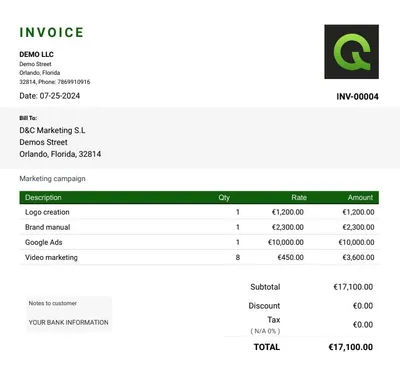
Step 2: Use the “must have” fields (the non negotiables)
A clean invoice is not a design project. It is a payment instruction.
Here’s the contractor ready field list that prevents back and forth.
Header fields
- Business name
- Address
- Email and phone
- Tax ID if relevant (varies by country and state)
- Client name and billing address
- Job site address (if different)
- Invoice number (unique)
- Issue date
- Due date
- Payment terms (Net 7, Net 15, due on receipt)
- Accepted payment methods
The IRS is clear that businesses need recordkeeping that shows income and expenses and keeps supporting documents. IRS recordkeeping overview
Line item fields
For each line item, include:
- Description (plain English)
- Quantity
- Unit
- Unit price
- Line total
- Tax (if applicable)
Footer fields
- Subtotal
- Taxes
- Discounts (if any)
- Total due
- Notes (short, factual)
- Your payment instructions
Step 3: Write line items that clients approve fast
The fastest paid invoices have line items that match how clients think.
Not “Labor.” Not “Materials.” Not “Work.”
Use this structure:
Verb + object + location + proof
Examples:
- Install vanity faucet in master bath (includes supply lines)
- Patch and texture drywall in hallway (two coats, sanded)
- Replace shutoff valve under kitchen sink (tested for leaks)
- Clean up and haul away debris (job site left broom clean)
If you want a Landscapers example, see this internal post and model your line items similarly:
Step 4: Add the “proof pack” that stops questions
If you only do one thing from this article, do this.
Attach proof so the client does not need to ask you.
Proof pack checklist
- Before and after photos (2 to 6)
- Signed estimate or signed scope (if available)
- Change order notes (even a simple bullet list)
- Material receipts (only if you bill pass through materials)
💡 A client who sees proof approves faster because there is less risk. Less risk equals less delay.
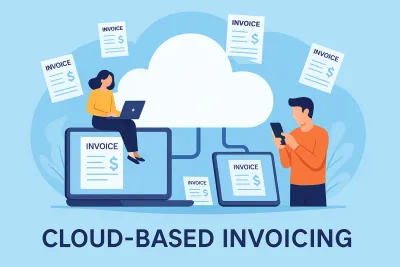
This is also where cloud invoicing helps because you can store everything with the invoice. If you want the full argument, use this internal link:
Step 5: Make it easy to pay (remove friction)
Friction is anything that forces the client to think.
Holded highlights online payment options and automatic reminders as part of getting paid faster. Holded invoicing software
Invoice Simple also positions itself around creating invoices anywhere and converting estimates to invoices quickly. Invoice Simple
Joist similarly emphasizes estimate to invoice and payment options. Joist
Regardless of tool, here is the rule:
The payment friction test
If the client needs more than 60 seconds to figure out how to pay, you will wait longer.
Use:
- Clear due date
- Clear “Total Due”
- Clear payment methods
- A short note like “Pay by card or bank transfer. Reply if you need a different option.”
Common invoice questions (quick answers)
How do I create a professional invoice using online software?
Use a clean template, add client and job details, write line items that read like a scope of work, then show subtotal, taxes, discounts, and total due. Send as a PDF or shareable link and keep it consistent for every job.
Helpful: Essential Fields to Include
Quick start: Free Online Invoice Generator and create invoices
How to customize an invoice template for freelance work?
Add a project name, a date range, and a short scope summary at the top. Keep line items specific and include simple payment terms so the client can approve without questions.
Helpful: How to invoice as a freelancer
Can I automate invoice creation for recurring clients?
Yes. If your software supports recurring invoices, set the schedule and keep the scope consistent. If not, duplicate the last invoice, update dates, and resend. The real win is pairing it with reminders so you do not chase the same invoice every month. With QUICKADMIN you can do it in both cases.
Which services offer invoice tracking and payment reminders?
Look for tools that show invoice status (sent, viewed, overdue) and support reminders. Tracking matters because it tells you if the client missed the email or is delaying approval.
Helpful: invoice tracking and invoice manegement
How to include taxes and discounts properly on an invoice?
Keep the math transparent. Use this order: subtotal, discount (if any), taxable amount, tax line (rate + amount), then total due. This prevents approval delays because the client can see exactly how you got the final number.
How to make an invoice that complies with US tax regulations?
Use a consistent invoice number system, include business and client details, dates, and clear descriptions of what you delivered. Sales tax rules vary by state and by what you sell, so list any tax as its own line item and keep supporting records for bookkeeping.
Step 6: Use the Invoice Payment Readiness Score (original framework)
This is the part most “how to make an invoice” articles skip.
A good looking invoice can still be slow to pay.
So use a quick scoring system before you send.
Invoice Payment Readiness Score (0 to 100)
Score yourself, 0 to 25 each:
Clarity (0 to 25)
Can the client understand every line item without calling you?Proof (0 to 25)
Did you attach photos, signed scope, and change notes?Payment simplicity (0 to 25)
Is the total obvious and the method easy?Follow up system (0 to 25)
Do you have a reminder plan and a polite script ready?
Goal: 80+ before you send.
💡 If your score is under 80, the client will do what every busy person does. They postpone it until they “have time.”
Step 7: Send it in the right moment
Timing matters more than people admit.
Best times to send
- Right after the walkthrough or job completion confirmation
- Right after the client says “looks good”
- Right after you resolve a punch list item
Worst times to send
- Late at night with no context
- Days later with vague descriptions
- During a dispute or uncertainty about scope
Step 8: Turn estimates into invoices (so you stop forgetting items)
This is where contractor focused tools win.
Many platforms push “estimate to invoice” because it reduces errors and speeds billing. Invoice Simple and Joist both highlight converting estimates into invoices. Invoice Simple and Joist
If you already estimate in QuickAdmin, you can keep your scope and pricing consistent, then generate the invoice from the approved estimate.
For estimating depth (and internal linking), connect this article to:
Step 9: What are the best apps for generating invoices on my phone?
If you invoice on site, the best apps are the ones that let you create, attach photos, and send in under two minutes without switching tools.
If you are a contractor, the “desktop only” billing style is outdated.
You need:
- fast line item entry
- photo attachments
- client contact autofill
- ability to send from the job site
QuickAdmin is positioned as a Progressive Web App you can install and use across devices.
Step 10: Follow up without sounding desperate (the script)
Remember the open loop from the beginning: why does one invoice get paid in two days and another in two weeks?
One big reason is what happens after you hit send.
QuickBooks’ 2025 report shows how widespread overdue invoices are, so you need a follow up plan that is normal and professional. QuickBooks 2025 US report
The follow up schedule (simple, not annoying)
- Day 0: Send invoice with a one sentence summary.
- Day 3: Friendly check in.
- Day 7: Confirm any questions and offer a quick call.
- Day 14: Final reminder, offer to resend.
The 30 second follow up script (the one I promised)
Copy paste this:
“Hi {Name}, quick check in to make sure invoice {Number} came through for {Job Address}. Total is {Total} due {Due Date}.
If anything needs adjusting for your approval process, tell me what to change and I’ll resend it today.”
It works because it:
- assumes the best
- offers help
- makes the next step obvious
Where can I find free invoice templates for small businesses?
If you need a free invoice template, start with a simple structure you can reuse every time and customize with your logo, terms, and payment methods.
Simple invoice template (text)
INVOICE
Invoice #:
Invoice Date:
Due Date:
Terms:
From
Business name
Address
Phone | Email
Bill To
Client name
Billing address
Job site address (if different)
Scope summary (1 to 2 sentences)
Example: Replace kitchen faucet and shutoff valves, test for leaks, dispose old parts.
Line items
- Description | Qty | Unit | Rate | Total
- Description | Qty | Unit | Rate | Total
Subtotal:
Tax:
Total:
Payment instructions
Pay by: card, bank transfer, check.
Notes: Thank you. Please reply if you need a W 9, COI, or additional documentation.
Line item spreadsheet headers (CSV)
Copy this into Google Sheets:
date,job,address,line_item,qty,unit,unit_price,tax_rate,line_total,notes
Competitor study (what others do well, and the gap you can use)
Most competitors cover “invoice basics.” Fewer cover the field workflow: proof, clarity, and follow up.
Competitor study: Holded vs QuickAdmin
Holded focuses on invoicing features like reminders and online payments. Holded invoicing
QuickAdmin’s positioning leans into contractor workflows and a free plan with strict limits, plus voice dictation and Home Depot price consulting. QuickAdmin free plan
Competitor study: Buildertrend, Joist, Invoice Simple vs QuickAdmin
Buildertrend emphasizes construction billing workflows and creating invoices from estimates, bills, purchase orders, and change orders. Buildertrend construction invoice software
Joist and Invoice Simple lean hard into mobile estimate and invoice creation and quick conversion. Joist and Invoice Simple
Jump link:
Comparison table (fast view + soft CTA)
| Tool | Best for | Strengths | Common gap for contractors |
|---|---|---|---|
| QuickAdminSoftware | Small contractors and field crews | Job based invoicing, templates, attachments, mobile first workflow, invoice tracking | Best when you use a consistent process (scope, photos, follow up) to get the full benefit |
| Holded | SMB admin and invoicing | Reminders, online payments | Less trade specific workflow language |
| Invoice Simple | Mobile solo operators | Fast invoices and estimates | Can feel like “just a template” if you need deeper job tracking |
| Joist | Trade contractors | Estimate to invoice, mobile workflow | Feature sets vary by plan |
| Buildertrend | Larger construction projects | Change orders and invoice workflows | Heavy for very small crews |
| Quipu | Freelancers and small firms | Invoices and treasury features | Less trade specific line item patterns |
| ContaSimple | Self employed SMB | Invoices and expenses | Not built around job workflows |
| InvoiceBerry | Simple web invoicing | Quotes to invoices, recurring invoices | Not trade specific by default |
If you want a fast start: use the invoice generator post, then route to the app:
invoice generator
Real world data and practical numbers (so this is not theory)
Late payment is not rare. It is common.
- In the US, QuickBooks reports 56% of small businesses surveyed are owed money from unpaid invoices, averaging $17.5K. QuickBooks 2025 US report
- In the UK, the Small Business Commissioner reported businesses spend time chasing late payments, averaging 86 hours per affected business per year in one 2025 research release. UK SBC late payments research
- A 2024 European Commission report (EU Payment Observatory, prepared by CEPS and EY) examines how electronic invoicing can reduce late payments. EU Payment Observatory e invoicing report PDF
- Atradius’ B2B payment practices trends, United States 2024 discusses overdue invoice behaviors and timing. Atradius US 2024
💡 Micro testimonial (common contractor reality): “Once we added photos and a one sentence scope summary, approvals stopped dragging out.”
Conclusion (and your next action)
If you only remember one thing:
An invoice that gets paid fast is an invoice that does not create questions.
Use the flow:
- Correct invoice type
- Must have fields
- Clear line items
- Proof pack
- Easy payment
- Follow up script
And yes, here is the promised script again, because it is that useful:
“Hi {Name}, quick check in to make sure invoice {Number} came through for {Job Address}. Total is {Total} due {Due Date}.
If anything needs adjusting for your approval process, tell me what to change and I’ll resend it today.”
If you want a simple way to put this system into practice, start here:
FAQ
How do I create a professional invoice using online software?
Use a clean template, add client and job site details, write line items that read like a scope of work, then show subtotal, tax, discounts, and total due. Send it as a PDF or a shareable link and keep a copy for your records.
Helpful: https://quickadminsoftware.com/blog/creating-invoices-essential-fields-to-include/
Quick start: https://quickadminsoftware.com/blog/invoice-generator/ and https://quickadminsoftware.com/invoicegen/
What are the best apps for generating invoices on my phone?
The best app is the one you will actually use on site: fast mobile entry, saved clients, photo attachments, and one tap sending. For contractors, a Progressive Web App style experience is ideal because it works across phone and desktop.
Helpful: https://quickadminsoftware.com/blog/installing-progressive-web-application/
Where can I find free invoice templates for small businesses?
You can use free templates from invoice generators or editable document templates, then add your logo, payment terms, and invoice numbering. If you want a contractor focused starting point, use QuickAdmin’s invoice generator and keep the same layout for every client.
Start here: https://quickadminsoftware.com/blog/invoice-generator/
How to customize an invoice template for freelance work?
Add a project name, date range or milestone, and a short scope summary at the top. Keep line items specific, include your payment terms, and add one clear contact method so approvals do not stall.
Helpful: https://quickadminsoftware.com/blog/how-to-invoice-as-a-freelancer/
Can I automate invoice creation for recurring clients?
Yes. If your software supports recurring invoices, set the schedule and keep the scope consistent. If it does not, duplicate the last invoice, update dates, and resend. Pair it with reminders so you are not manually chasing payments.
Which services offer invoice tracking and payment reminders?
Look for tools that show invoice status (sent, viewed, overdue) and allow reminders. Tracking matters because it tells you whether the client missed the email or is simply delaying approval.
Helpful: https://quickadminsoftware.com/blog/free-invoice-tracker/ and https://quickadminsoftware.com/blog/invoice-management-process-guide/
How to include taxes and discounts properly on an invoice?
Use this order for clarity:
- Subtotal (sum of line items)
- Discount (if any)
- Taxable amount
- Tax line (rate and amount)
- Total due
This prevents confusion and reduces back and forth during approval.
What’s the easiest way to send invoices and get paid faster?
Send the invoice the same day the work is completed, include a clear due date, and make payment instructions obvious. Attach proof photos when relevant and follow up on day 3 with a short message that includes invoice number, total, and due date.
Helpful: https://quickadminsoftware.com/blog/cloud-based-invoicing-benefits/
How to make an invoice that complies with US tax regulations?
Use consistent invoice numbers, include business and client details, dates, and clear descriptions of what you delivered. Sales tax requirements vary by state and by what you sell, so list any tax as a separate line item and keep supporting documentation for bookkeeping.
What features should I look for in an invoicing software?
Prioritize: templates, saved clients, estimate to invoice, job site notes, attachments, tracking, reminders, and export for bookkeeping. If you do field work, mobile speed and photo support are not optional, they are what keeps billing from piling up.
What is the difference between an estimate and an invoice?
An estimate is a pre work proposal. An invoice is the request for payment after the work (or milestone) is completed. Converting an approved estimate into an invoice helps reduce missing items and pricing errors.