
Handyman Estimate and Invoice Software
How handyman contractors estimate small repairs, labor, materials, and add-ons → then turn approved work into clear invoices.
by Eng. José Manuel Siso Colmenares • 9/17/2026 · Updated: 10/29/2026

Handyman Estimate and Invoice Software
Updated: October 29, 2026.
The call is usually about one thing. A loose door. A dripping handle. A shelf that never got hung.
Then you walk in. There is also a cabinet hinge, two drywall holes, a towel bar hanging by one screw, a smoke detector chirping, and “while you’re here, can you take a look at…” None of those tasks is huge on its own. Together, they can wipe out your afternoon and your margin if you never wrote them down or priced them.
Handyman estimate and invoice software exists for that messy middle: small tasks, changing scope, travel, materials, and the extras that appear after you open the toolbox.
How do you estimate handyman work when the job is really a list → and the list grows once you arrive?
Quick answer: Group the tasks into one job, price labor and materials (including a minimum service charge), write down approved extras, convert the estimate into an invoice, and track payment → without retyping the work.
What this guide covers:
- Why “small jobs” still need a real estimate
- A pricing approach that includes travel, setup, and cleanup
- Three job types that should not share one price sheet
- A live QuickAdmin demo: estimate → add-on → invoice (with screenshots)
- How to move from estimate to invoice without retyping
Why handyman estimates are harder than they look
To the client, each item feels like a five-minute favor. To you, it is a business day made of drywall patches, door adjustments, caulk, minor plumbing or electrical, fixture installs, TV mounts, furniture assembly, cabinet tweaks, pressure washing, fence fixes, punch lists, and rental turnovers.
Twenty minutes here and an hour there is fine; until you add travel, parking, setup, tool loading, a store run, texts with the owner, cleanup, photos, notes, payment follow-up, and return visits. That overhead is why a blank invoice app is not enough. You need a workflow.
Demand is not going away. The U.S. Bureau of Labor Statistics projects employment for general maintenance and repair workers to grow 4 percent from 2024 to 2034. Harvard’s Joint Center for Housing Studies reports that the U.S. still spends hundreds of billions each year on home maintenance and improvement. There is plenty of work; and plenty of competition for contractors who price and document it clearly.
Rule of thumb: if the work uses your time, materials, schedule, or payment terms, it deserves a professional estimate → even when the ticket looks small.
The real pricing problem: the visible fix vs. the full visit
A quote that only prices the thing on the wall misses the visit.
Weak:
Install shelf: $75Stronger:
Minimum service visit: $150
Shelf installation labor: included
Wall anchors and small materials: $18
Payment terms: Due Upon Receipt
The second version tells the truth about what it costs to show up, do the work, and leave the space clean.
Framework: visit → task → material → approval → invoice
| Stage | What you document | Why it matters |
|---|---|---|
| Visit | Address, access, travel, minimum charge | Protects your time |
| Task | Each repair or install | Stops vague scope |
| Material | Parts, supplies, fasteners, patch materials | Stops silent material loss |
| Approval | Original work and add-ons | Separates free favors from paid work |
| Invoice | Completed work, terms, balance | Makes payment easier |
What handyman estimate software should help you calculate
Labor
| Labor item | Quantity | Rate | Total |
|---|---|---|---|
| Minimum service visit | 1 | $150 | $150 |
| General repair labor | 2 hours | $85 | $170 |
| Drywall patch labor | 1.5 hours | $85 | $127.50 |
| Final cleanup | 1 | $35 | $35 |
Materials
Screws, anchors, caulk, sealant, compound, sandpaper, paint touch-up, patches, hinges, knobs, supply lines, washers, plates, adhesive, tape, wood filler, trim pieces, disposal bags.
Small materials and fasteners: $35Travel and access
Travel and material pickup allowance: $45Add-ons
Approved add-on: adjust second bedroom door and replace loose strike plate.For payment timing, Due Upon Receipt keeps small jobs simple. Property managers and repeat commercial clients may need Net 7 or Net 15; put it in writing either way.
Handyman estimate template you can copy
HANDYMAN ESTIMATE

Contractor:
Company / address / phone / email / website / license if required

Client:
Name / billing address / phone / email

Job:
Job address / unit / access notes / parking notes
Estimate number / date / valid until / prepared by

Scope:
Clear description of the visit

Task list:
1.
2.
3.
4.

Labor:
Minimum service visit / hours / rate / flat-rate items / labor total

Materials:
Small materials / client-supplied / contractor-supplied / allowance / total

Travel and access:
Travel / parking / pickup / special access

Add-ons and exclusions:
Approved / pending / excluded

Payment terms:
Deposit / balance / due date / how to pay

Totals:
Subtotal / tax / discount / total
Three job types (three pricing shapes)
Minimum service call: one small repair, short visit, simple install, quick look, local punch item.
Multi-task visit: rental turnover lists, homeowner repair lists, property manager work orders, half-day or full-day bundles.
Small project: trim, closet shelving, drywall repair and paint, gate repair, bathroom accessories, flooring repair, minor carpentry.
Do not price a 20-minute hinge swap the same way you price a half-day turnover list. The math (and the paperwork) should match the day.
Follow a real handyman job in QuickAdmin
This is a real job-based estimate from the QuickAdmin demo account → job Handyman Home Repair Demo, customer Taylor Demo, Orlando FL.
Estimate title: Handyman Repairs | Labor and Materials
Terms note: 25% deposit after approval (balance due on completion) valid 14 days
Original scope total: $450
With approved add-on: $525
The screenshots below follow that same job from estimate to invoice. This matters because the client, address, scope, add-on, and final amount stay connected instead of being recreated in separate documents.
Step 1: Find the job and open the estimate
The job filter shows one estimate under Handyman Home Repair Demo. The title, customer, status, and $525 total are visible before you open anything.
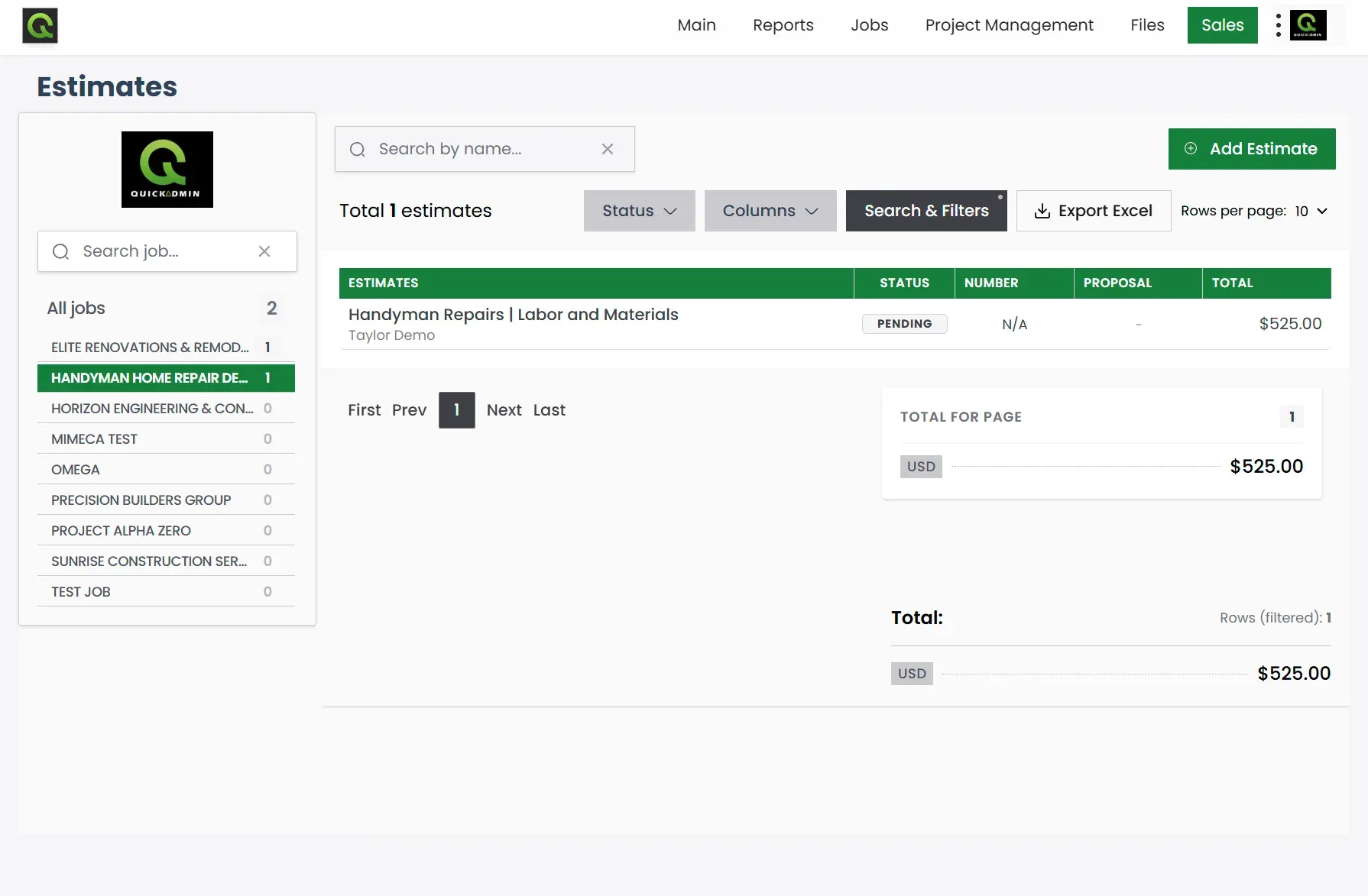
For a busy handyman, this is more useful than searching through PDFs named “estimate-final-v2.” You can return to the job by customer or project name and see what is still pending.
Step 2: Turn the visit into clear line items
The scope gives the client one plain-English summary:
Patch one drywall area up to 2 sq ft, adjust one interior door, and install two shelves on suitable walls.
Exclusions: painting, concealed damage, electrical or plumbing work, and structural repairs.
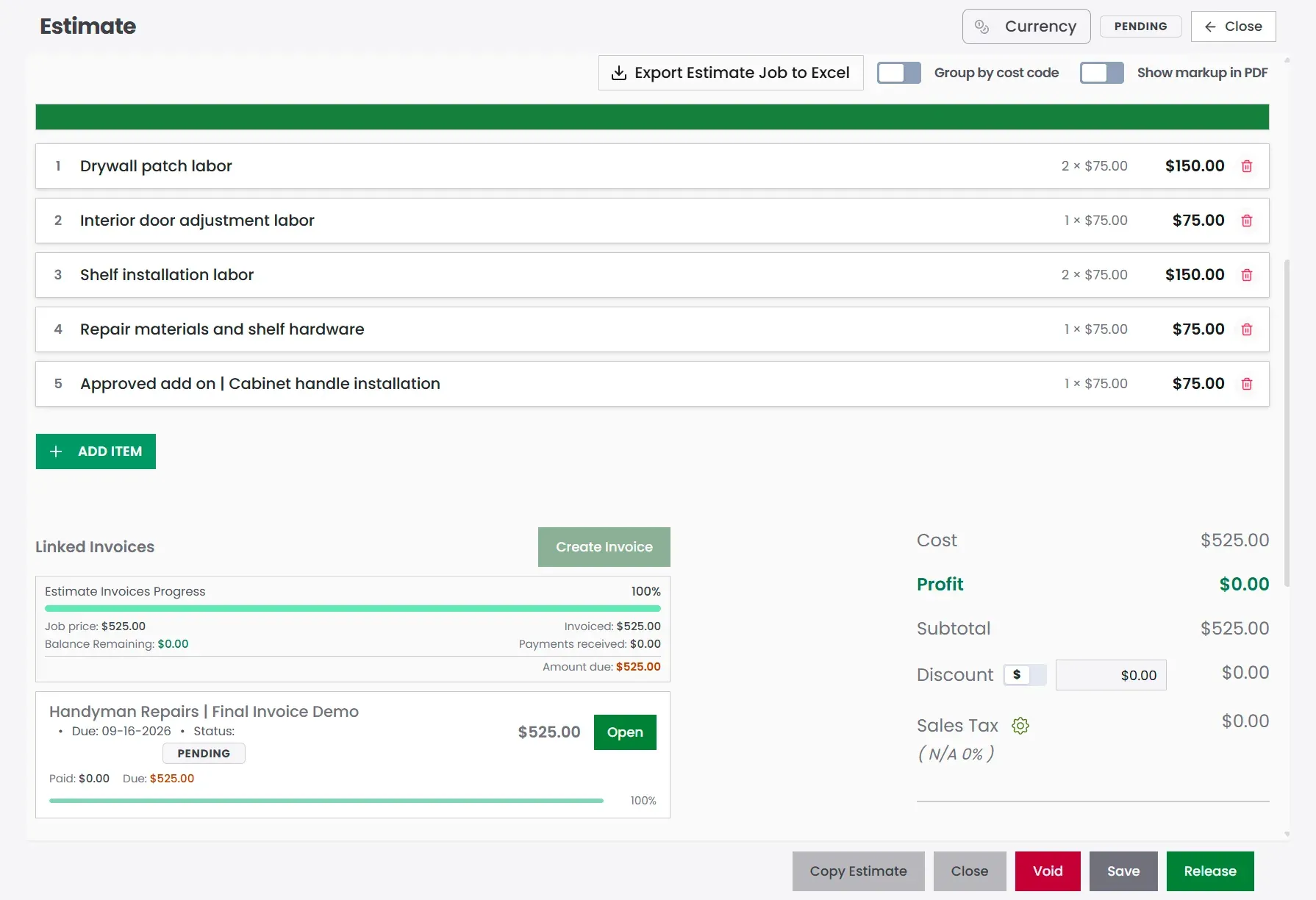
Then each task gets its own price:
| Item | Qty | Rate | Total |
|---|---|---|---|
| Drywall patch labor | 2 | $75 | $150 |
| Interior door adjustment labor | 1 | $75 | $75 |
| Shelf installation labor | 2 | $75 | $150 |
| Repair materials and shelf hardware | 1 | $75 | $75 |
| Approved add-on | Cabinet handle installation | 1 | $75 | $75 |
Estimate total: $525.00
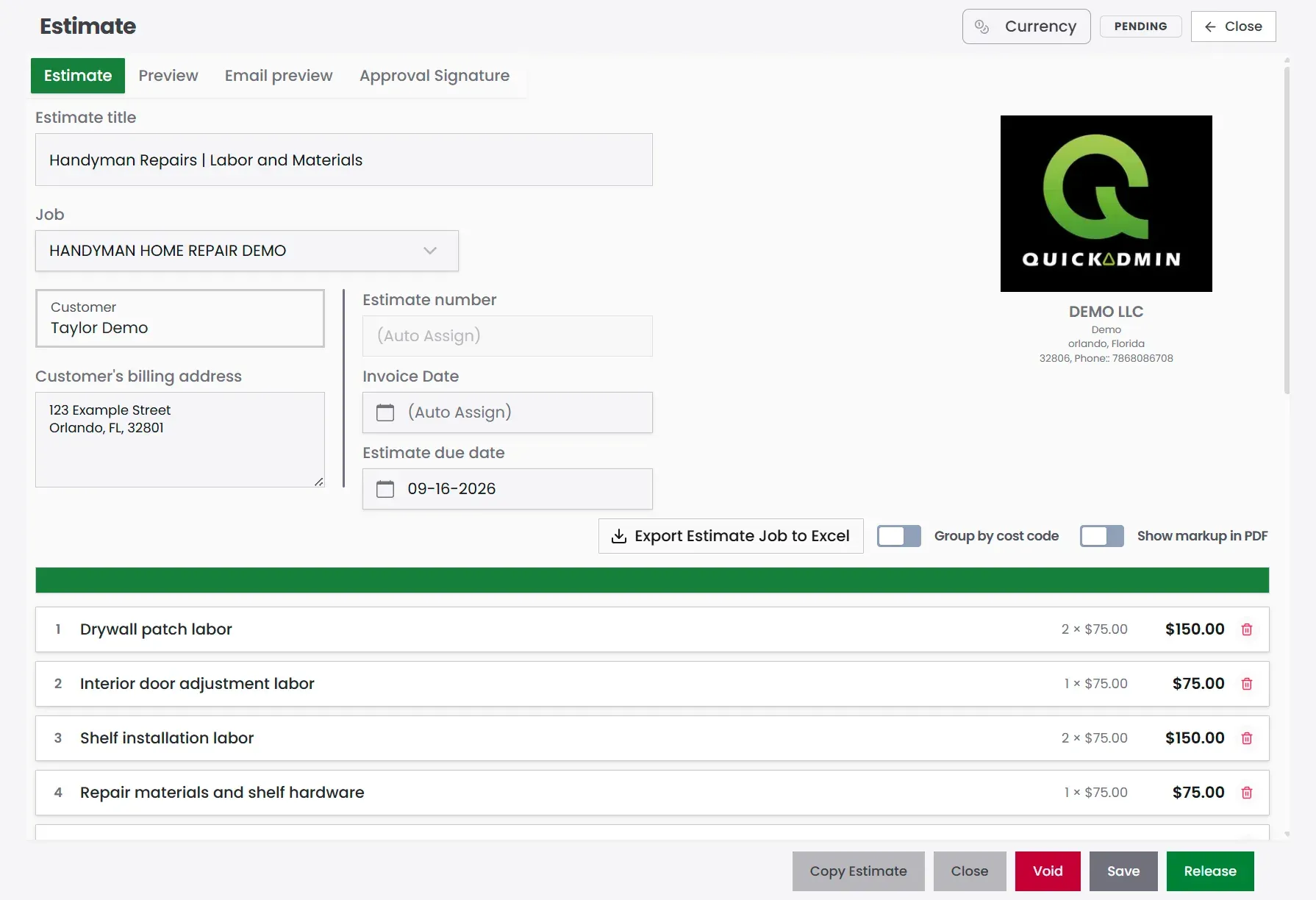
In the screen above, labor and materials are easy to scan. The cabinet-handle request is a separate $75 line, so the customer can see exactly why the estimate moved from $450 to $525.
Step 3: Check the customer-facing estimate
The editing screen helps you build the price; the Preview tab shows what the customer will receive. Check the company details, Bill To, due date, task descriptions, and total before sending.
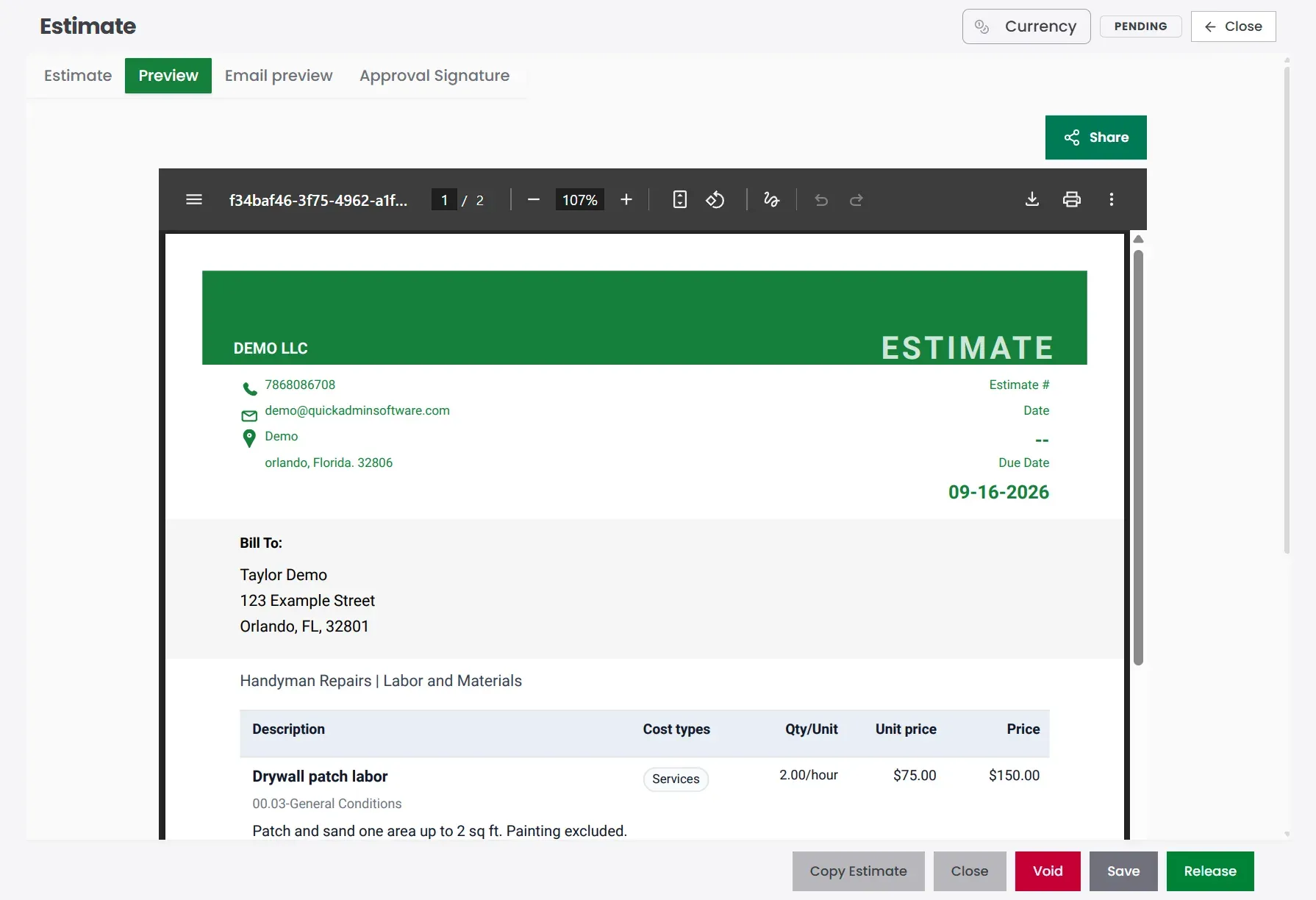
This final check catches vague descriptions and missing terms before they become customer questions.
A practical pricing formula
Handyman estimate =
labor
+ materials
+ travel / access (or minimum visit)
+ cleanup
+ overhead
+ profit
+ approved add-ons
Step 4: Convert the approved estimate into an invoice
Once the customer approves the work, keep using the same job:
- Create the job with client and address.
- Build the estimate inside the job.
- List every task; not “handyman repairs.”
- Add labor, materials, and a minimum visit when the ticket is small.
- Add exclusions before approval.
- Send and get the yes.
- Do the work.
- Document approved add-ons on the same estimate.
- Convert to an invoice (the demo invoice stays linked to EST #630).
- Track payment; use QuickBooks invoice synchronization when useful.
The progress panel confirms that the estimate and invoice remain linked. It also makes partial or full invoicing easier to understand at a glance.
Better task language
Weak: Fix items around house
Better: Drywall patch labor → patch and sand one area up to 2 sq ft. Painting excluded.
Client-supplied materials
Client-supplied items must be onsite before the scheduled visit. Extra time caused by missing or incorrect materials may be billed separately.Useful exclusions up front: painting, hidden damage, electrical or plumbing beyond the list, structural work, permits, appliances, extra rooms, and material pickup unless priced.
Step 5: Send a bill that matches the approved work
Once the estimate is converted, the job invoice keeps the same line items (including the cabinet handle add-on) so the bill does not surprise anyone. For the shared contractor chain beyond handyman work, see create estimates for contractor jobs.
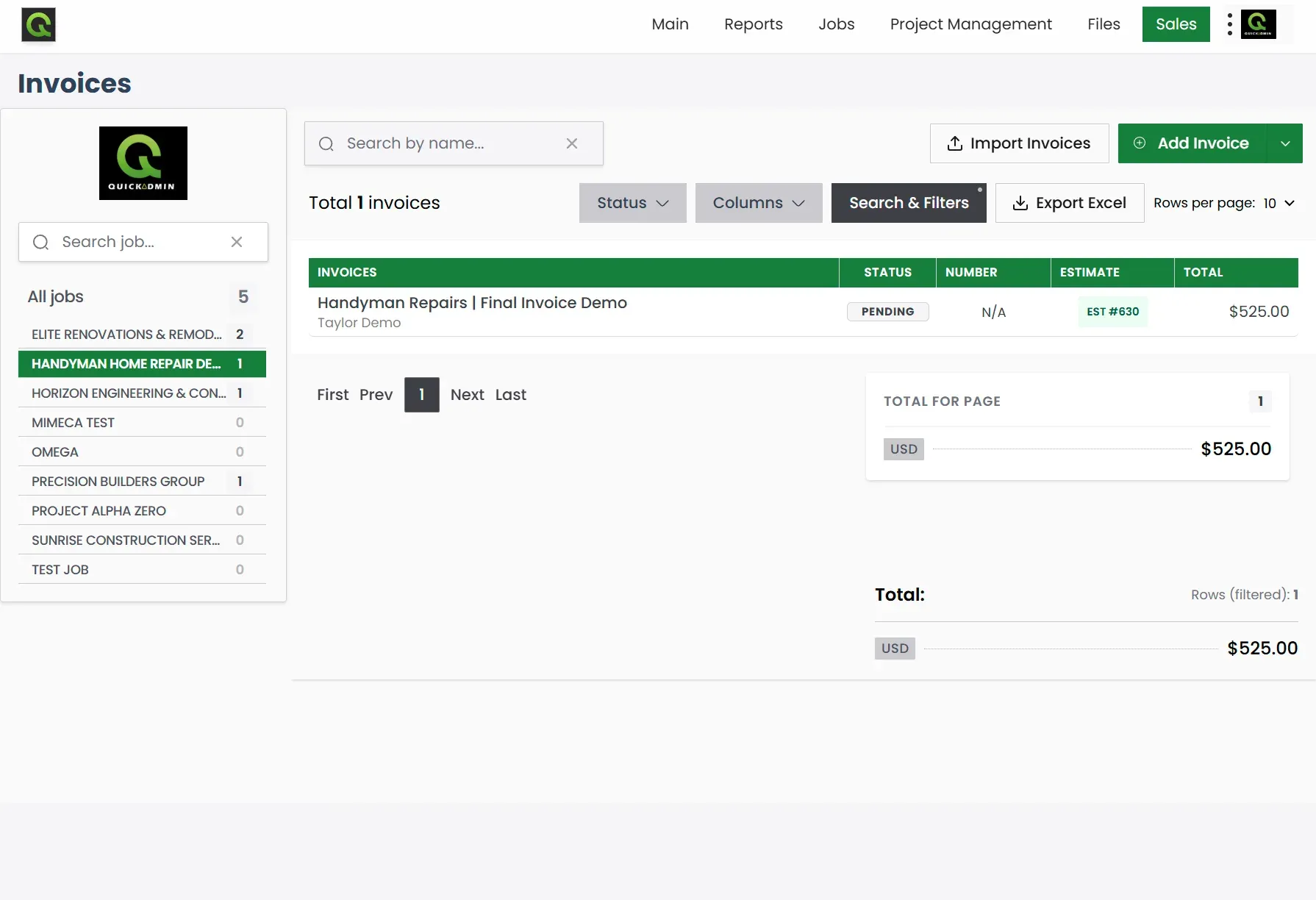
The invoice list gives the office a quick answer to four questions: which job, which customer, which estimate, and how much? To follow what happens after you send, see how to track invoice payments and status by invoice number.
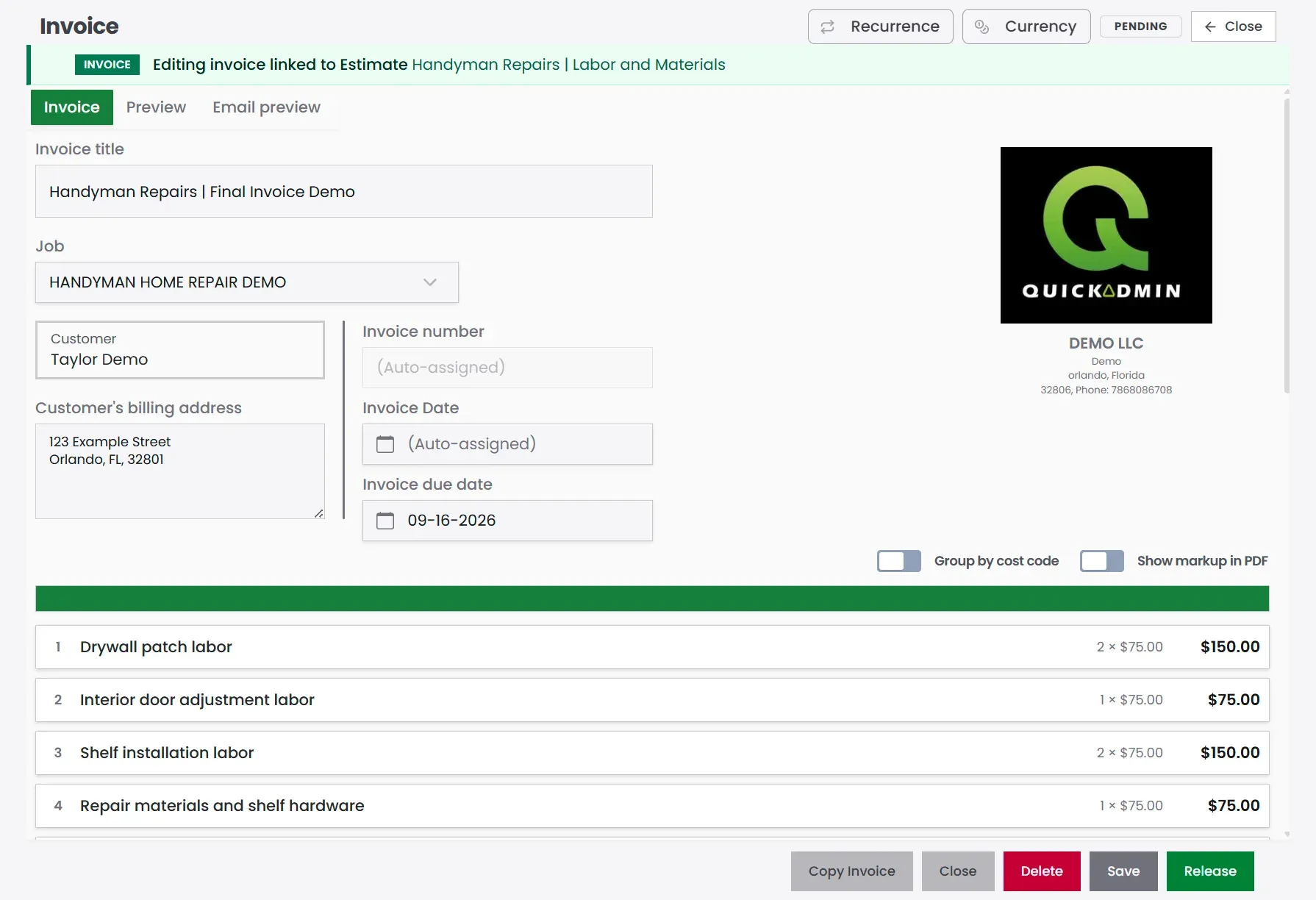
Open the invoice and the task list is still recognizable. That continuity is what makes the bill easier for a homeowner or property manager to approve.
Always show when and where:
Job: Handyman Home Repair Demo
Bill to: Taylor Demo; 123 Example Street, Orlando, FL 32801
Due date: on the invoice (auto or set)
List completed work the same way it was estimated:
Completed: drywall patch, interior door adjustment, shelf installation, materials, and approved cabinet handle installation.Separate approved extras on both the estimate and the invoice:
| Approved add-on | Amount |
|---|---|
| Cabinet handle installation (customer-supplied handles) | $75 |
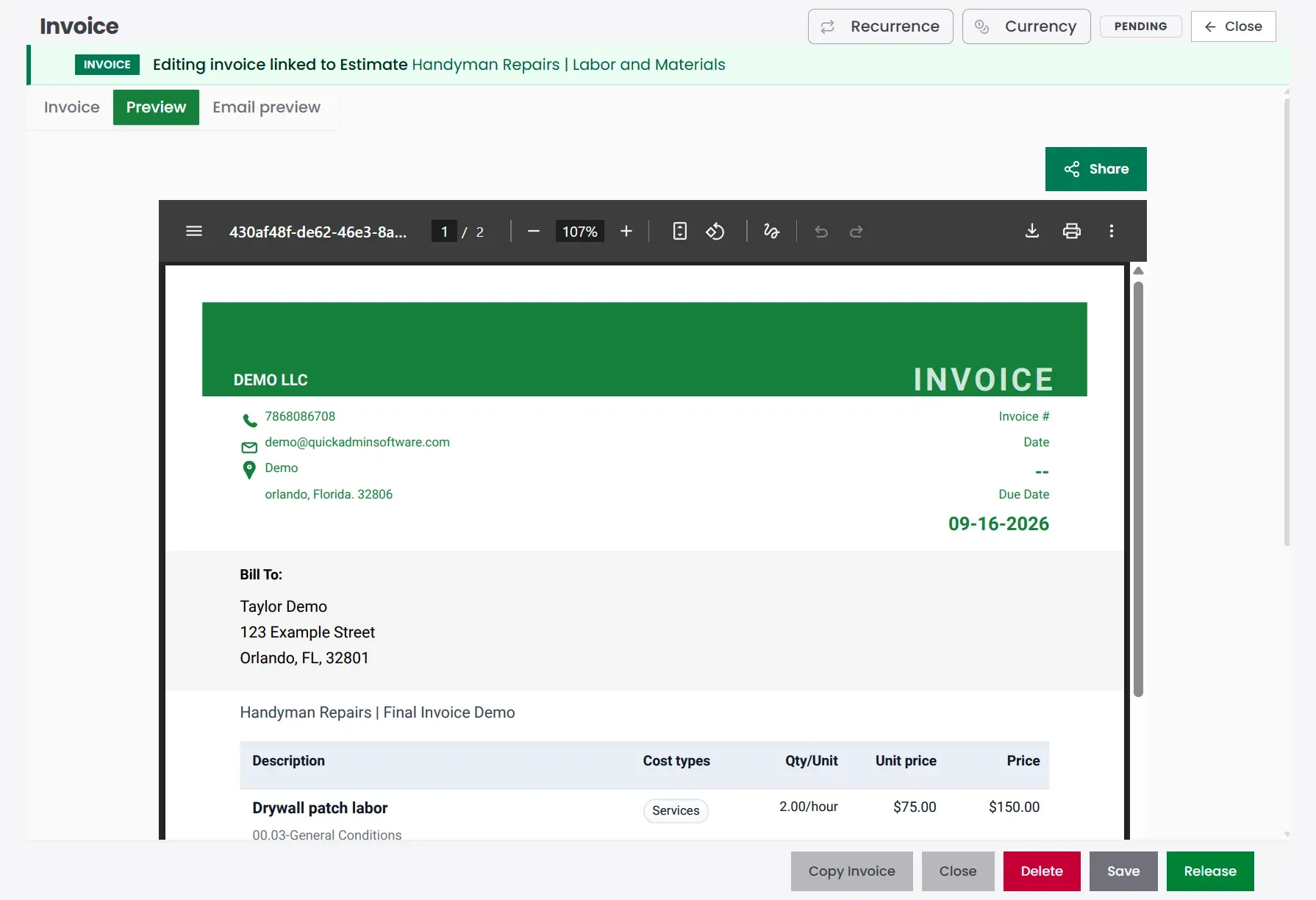
The PDF is the final customer-facing version: company details, billing information, task descriptions, due date, and total in one place. Photos help too; especially with property managers. Before/after shots, receipts, work order numbers, and signed estimates speed approvals.
Payment terms by job type
| Job type | Suggested terms |
|---|---|
| Small repair / minimum call | Due Upon Receipt |
| Rental turnover punch list | Due Upon Receipt or Net 7 |
| Property manager work | Net 7 or Net 15 |
| Small project | Deposit + balance on completion |
| Materials-heavy job | Deposit before buying materials |
| Repeat commercial client | Net 15 if approved |
Payment is due upon receipt unless different terms were approved in writing.Deposit pattern for larger handyman projects:
| Milestone | Payment |
|---|---|
| Deposit before scheduling | 40% |
| Balance due upon completion | 60% |
How QuickAdmin fits a handyman day
| Stage | In QuickAdmin | Result |
|---|---|---|
| Request | Create job | Client and address stay with the visit |
| Estimate | Task list, labor, materials | Scope is clear before you drive |
| Approval | Send estimate | Client signs off before work starts |
| Field | Notes, files, photos | Proof stays with the job |
| Add-ons | Document approved extras | “Can you also…” becomes billable |
| Billing | Convert to invoice | No retyping |
| Payment | Track status | You know what is open |
| Accounting | QuickBooks invoice synchronization | Less weekend bookkeeping |
A basic invoice app can send a bill. Spreadsheets can hold a list. What they rarely do well is keep the visit, the task list, the extras, the photos, and the invoice on the same job record; which is where handyman margin usually leaks.
Mistakes that cost handymen real money
No minimum service charge. Travel, tools, setup, cleanup, and admin still happen on a $40 hinge.
Vague task lists. “Fix stuff around the house” is how disputes start.
Mixing client-supplied materials into your risk. Write that you install what they provide and are not responsible for defective or incomplete kits.
Forgetting the store run. A “quick trip” for anchors is still billable time; price it or include it in the minimum.
Free add-ons. When they say “can you also,” add it to the job before you invoice.
No photos for property managers. Pictures close invoices faster than long email threads.
Clauses worth keeping ready
This estimate is valid for 15 days. Material pricing and availability may change after that.A minimum service charge applies to cover travel, setup, basic tools, administrative time, and the listed service visit.Work not listed in the approved scope may require separate approval before completion or billing.This estimate does not include hidden damage, concealed conditions, structural repairs, code corrections, or additional work discovered after work begins unless approved separately.Before and after photos may be attached for documentation and invoice approval when applicable.Related contractor guides
- Create estimates for contractor jobs
- How to Make an Invoice
- Why PWA billing and estimating is the future
- Job Costing Software for Small Contractors
- Purchase Order Software for Contractors
- Construction Change Order Template 2026
Bottom line
Handyman work looks simple from the sidewalk. The business side is travel, setup, a task list that grows, materials, cleanup, documentation, and getting paid without a fight.
With QuickAdmin, you can create the job, list the tasks, price labor and materials, lock exclusions, catch approved add-ons, convert the estimate into an invoice, and track payment; so small jobs still run like a professional service.
Handyman estimate worksheet and scope check
Price the complete visit: task list, travel, setup, labor, materials, shopping time, cleanup, and owner supplied items.
A short installation may still require a full visit. List each approved task and price additions before they reach the final invoice.
Worked cost example you can download
This fictional calculation demonstrates the structure, not local market rates or a completed customer project. Replace the quantities, supplier allowances, and loaded labor cost with your own inputs. Tax is excluded from this example.
| Cost item | Quantity | Unit cost | Extended cost |
|---|---|---|---|
| Repair labor | 4 person hour | $35.00 | $140.00 |
| Travel and setup labor | 1 person hour | $35.00 | $35.00 |
| Materials allowance | 1 lot | $90.00 | $90.00 |
| Disposal allowance | 1 lot | $25.00 | $25.00 |
Direct cost is $290.00. An illustrative 10% overhead allocation adds $29.00, producing a cost basis of $319.00. For a target margin of 20%, divide that cost basis by 0.80: the illustrative selling price is $398.75 before tax. A 20% markup would produce a lower margin of about 16.7%.
Download the handyman estimate example CSV. Cost rows and summary rows are labeled separately. Recalculate after replacing the inputs; the file contains example values rather than an automatic pricing system.
Match the plan to the workflow
QuickAdmin Free currently includes 6 estimates and 3 invoices per month, one user, and two jobs. Basic adds unlimited estimates and invoices, integrated payments, and overdue reminders. Advanced adds time and shift management and photos and documents. Premium adds change orders, purchase orders, estimate budgets, per job bills and expenses, and QuickBooks invoice synchronization. Confirm the current plan limits before choosing.
Use construction guides by trade for related project scopes, the contractor financial workflow for shared cost control, and create a clear customer invoice for the next step. Keep the original scope, approved changes, and prior payments distinguishable when preparing the final invoice.
Free tools for a handyman visit
Account for travel, write a clear task list, and prepare an invoice from the work the customer approved.
- Trip charge advisor: Estimate travel distance, drive time, and a charge to review for the visit.
- Project description generator: Turn short job notes into a draft scope that you can review and edit.
- Free invoice generator: Prepare a customer invoice in your browser from the approved scope.
These are separate web tools. Review the inputs and any AI suggestions before using the result in an estimate or invoice. Browse the full tools library for other contractor calculations.
FAQ
What is handyman estimate and invoice software?
Software that helps you price small repairs, labor, materials, travel, minimum service charges, add-ons, and payment terms in one workflow → then turn the approved estimate into an invoice.
What should a handyman estimate include?
Client info, job address, scope and task list, labor, materials, travel or minimum charge, exclusions, approved add-ons, validity, payment terms, and total.
How should handyman contractors price small jobs?
Start with a minimum service charge, then add labor, materials, travel, setup, cleanup, overhead, profit, and approved add-ons.
How do handyman contractors turn estimates into invoices?
Create the job, build the estimate inside it, get approval, finish the work, document add-ons, then convert the estimate into an invoice.
What payment terms should handyman contractors use?
Due Upon Receipt for most small jobs. Deposit plus balance for larger projects. Net 7 or Net 15 for many property managers.
Can QuickAdmin create handyman estimates and invoices?
Yes → job-based estimates, task lists, labor and materials, add-ons, estimate-to-invoice conversion, payment tracking, and QuickBooks invoice synchronization.
Should handyman invoices list each task separately?
Yes. Separate tasks make approval easier for homeowners, landlords, and property managers.
Does QuickAdmin integrate with QuickBooks?
Yes. QuickAdmin offers QuickBooks invoice synchronization on Premium to keep invoices and accounting connected.