
Invoice Tracker Online (Free) | Track Payments & Status
Track invoice numbers, due dates, payments, and balances online. Free invoice tracker demo, downloadable template, and clear create vs track workflow.
by Gustavo Ferreyra • 6/17/2025 · Updated: 10/18/2026
Invoice Tracker Online: Track Invoices, Payments & Status
Updated: 2026-10-18
Free invoice tracker: Track invoice numbers, due dates, payments, outstanding balances, and status in one place.
A good invoice tracker answers three questions in under 60 seconds: What did I send? What’s due this week? Who hasn’t paid?
Invoice tracking: An invoice tracker records invoice number, customer, amount, due date, payment status and outstanding balance.
Need an invoice to track? Create one with our Free Invoice Generator, then use QuickAdmin to keep invoice numbers, due dates and payment status organized. For the full billing checklist, see how to make an invoice.
Invoice tracker example (what you should see first)
This is the view people mean when they search for an invoice tracker; not another long definition:
| Invoice # | Client | Project / Job | Due date | Amount | Paid | Balance | Status |
|---|---|---|---|---|---|---|---|
| INV-00482 | Rivera Properties LLC | Oak Ave Unit 2 Refresh | Sep 11, 2026 | $2,400 | $1,200 | $1,200 | Partially paid |
| INV-00491 | Nguyen Homes | Kitchen Backsplash Repair | Sep 9, 2026 | $650 | $0 | $650 | Overdue |
| INV-00497 | Summit Facilities | Lobby Drywall Patch | Sep 22, 2026 | $1,850 | $1,850 | $0 | Paid |
| INV-00503 | Taylor Demo | Handyman Home Repair Demo | Sep 28, 2026 | $525 | $0 | $525 | Sent |
You can keep that list in a spreadsheet or in software. Either way, every row needs an invoice number, client, project, due date, amount, amount paid, and balance.
Download blank tracker template (CSV) · Download filled example (CSV) · Start tracking in QuickAdmin
The CSV downloads are starter sheets with sample values. Update Amount paid, Balance due, and Status yourself when money comes in (or add Excel/Sheets formulas; see below).
See the workflow in QuickAdmin
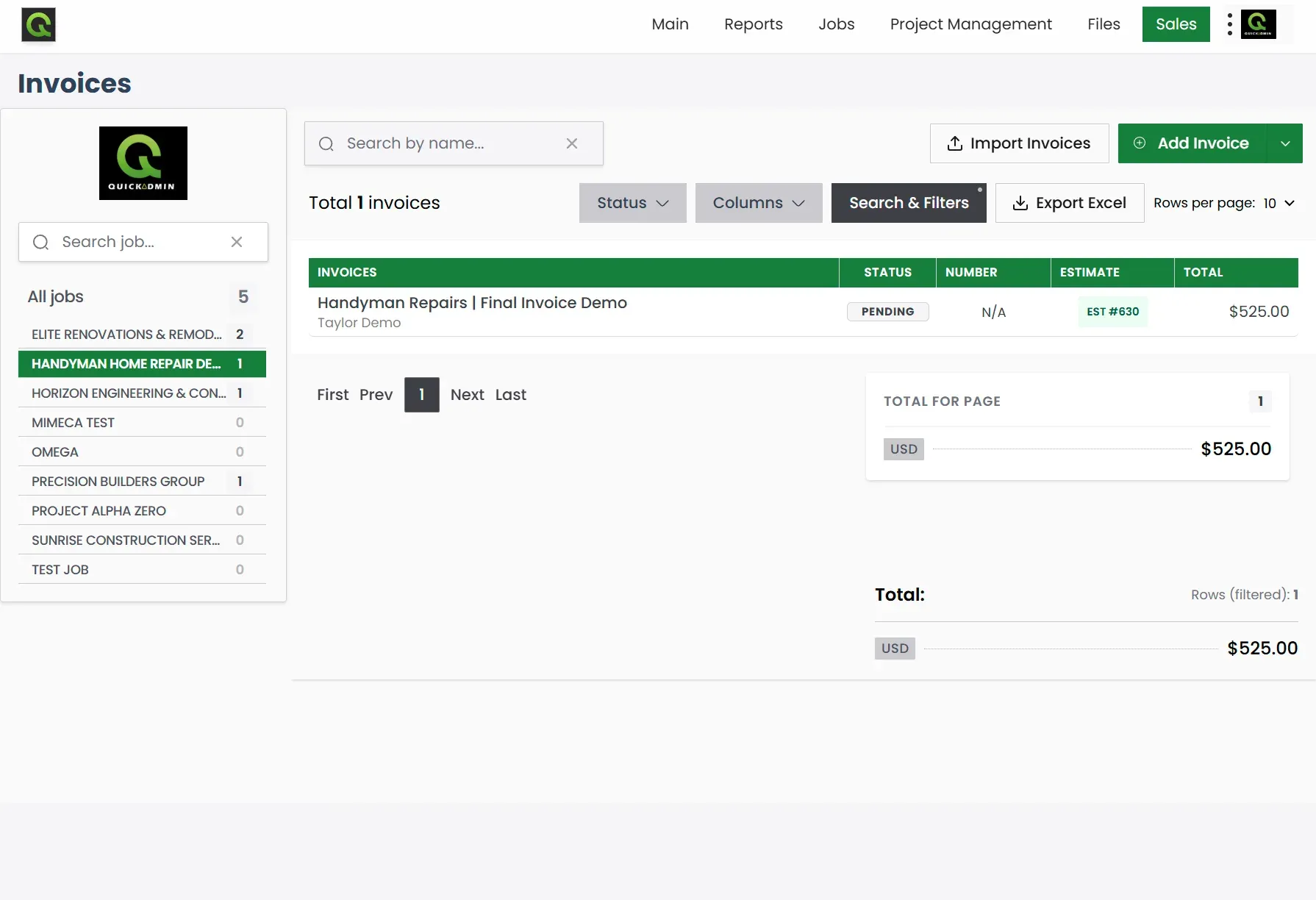
QuickAdmin workflow example: send the invoice, then filter by invoice number, due date, and payment status so unpaid balances stay visible.
Create an invoice vs track an invoice
These are two different jobs. Mixing them up is why many “invoice tracker” pages feel unhelpful.
| Goal | What you need | Where to go |
|---|---|---|
| Create a new bill | Line items, tax, totals, payment terms | Free invoice generator or how to make an invoice |
| Track an existing bill | Invoice number, status, due date, balance | QuickAdmin Free account or the CSV template on this page |
| Look up one invoice | Number (e.g. INV-00482) or client + date | Search/filter by invoice number (steps below) |
If a client texts “what’s the status of invoice 482?”, they are asking for tracking, not a new document. If you still need to bill the job, create the invoice first, then track it.
Coming from a quote? Use the contractor estimate workflow to win the job, then how to make an invoice to bill it. For AP/vendor process context, see the invoice management process guide.
What is an invoice tracker?
An invoice tracker is a system (spreadsheet or software) that records every invoice number, client, amount, due date, payment received, and balance in one place. Unlike an invoice generator that only creates documents, a tracker shows what’s sent, viewed, partially paid, overdue, and paid so you can follow up without guessing.
| Feature | Excel / Spreadsheet | QuickAdmin Free plan |
|---|---|---|
| Track invoice numbers | Manual entry | Automatic when you create the invoice |
| Payment status | Manual update | Status list you can filter and open by number |
| Amount paid / balance | You calculate | Record payments and see what is still open |
| Mobile access | Limited | Progressive Web App on phone or tablet |
| Automatic overdue reminders | None (unless you build them) | Paid plans (Basic and up) |
| Free plan limits | Unlimited rows, manual work | Up to 3 invoices / month, 6 estimates, 1 user, 2 jobs |
Many businesses start with the free CSV template below and move to an online tracker when manual updates eat too much time.
How to track invoice numbers and payment status
If you searched for “invoice number tracking”, “track invoice number”, or “invoice number tracking online”, you usually need one of two things:
- Find an invoice that already exists (status, balance, due date).
- Assign numbers automatically so every new bill is easy to find later.
Find an existing invoice by number
What you need before you search:
- The invoice number (best), or
- Client name + approximate issue date, or
- Project / job name if you bill by job
Then:
- Open your tracker (spreadsheet filter, or QuickAdmin Sales → Invoices).
- Search or filter by the exact number (example:
INV-00482). - Confirm due date, amount paid, balance, and status.
- Follow up using that number in the subject line or first sentence; clients respond faster when you reference the exact bill.
Fast free workflow (create once, track forever)
- Create and send the invoice in a QuickAdmin Free account (status tracking stays in the same invoices list).
- Or create a one-off PDF with the free invoice generator, then log the number in the CSV tracker (or enter the same bill in QuickAdmin if you want software status).
- Open the invoices list (or your sheet) to see sent, overdue, and paid status.
- Record partial payments (deposits, progress bills) so the balance stays accurate.
- Set a weekly review (15 minutes) to follow up on anything overdue.
The web generator is for creating a document in the browser. Tracking in QuickAdmin requires a Free account; do not assume the generator and the app sync automatically. For a paper-first approach, see our guide to tracking invoices in a notebook.
Invoice tracker vs invoice generator
| Invoice Generator | Invoice Tracker | |
|---|---|---|
| Purpose | Create and send invoices | Monitor payment status and balances |
| Answers | ”How do I bill this client?" | "Who owes me money, and what’s left?” |
| Core fields | Line items, tax, totals | Invoice number, due date, status, paid, balance |
| Best for | First-time invoicing | Cash flow and unpaid invoice follow-up |
| QuickAdmin | Web generator (create) | Free account (track status) |
Use the generator when you only need the document. Use a QuickAdmin account when you want invoice numbers and payment status in one place after you send.
Need the document first? Create your invoice now with our free invoice generator.
Need status tracking? Start a Free QuickAdmin account.
Project invoice tracker: deposits, progress bills, and balances
Many contractors do not send one invoice per job. They send a deposit, one or more progress bills, and a final balance. Your tracker should show the remaining balance for the whole project; not four disconnected rows with no link.
Example for one job (Oak Ave Unit 2 Refresh):
| Invoice # | Milestone | Amount | Paid | Balance | Status |
|---|---|---|---|---|---|
| INV-00470 | 50% deposit | $1,200 | $1,200 | $0 | Paid |
| INV-00485 | Progress / completion bill | $1,200 | $0 | $1,200 | Sent |
| Project total | $2,400 | $1,200 | $1,200 | Open |
(The single-row INV-00482 in the example table above is a different booking style: one $2,400 invoice with $1,200 already paid. Use whichever style matches how you bill.)
Rules that keep project tracking honest:
- Use the same project / job name on every related invoice.
- Always store Amount and Amount paid; never only “paid / unpaid.”
- Review open projects weekly: any job with a balance above $0 needs a next action.
- When the final payment clears, mark the last invoice Paid and confirm the project balance is $0.
If you outgrow a spreadsheet for multi-invoice jobs, track invoices inside the same QuickAdmin job so deposits and finals stay connected.
Why invoice tracking matters for small businesses
Small business owners know that keeping track of invoices isn’t just about staying organized; it’s about staying alive. Poor invoice tracking creates problems that go way beyond simple bookkeeping issues. Let’s learn about why proper invoice management has become essential to small business success.
The hidden cost of missed or late payments
The reality for small businesses is stark: 73% of businesses say late invoices hurt their operations [1]. This threat to business stability can’t be ignored.
Recent research reveals that 40% of small business owners believe their businesses might shut down within a year if late payments persist [1]. These delays create immediate cash flow problems that hurt everything from employee paychecks to business growth opportunities.
Time spent chasing payments adds another huge hidden cost. About 10% of small business owners spend 5-10 hours each week pursuing late invoices, while 20% spend 1-4 hours [1]. This adds up to 260 hours every year; that’s 12.5% of yearly working hours that could help grow the business instead.
Money owed to businesses paints an equally troubling picture. Around 28% of small businesses are owed up to £9,999 in late payments, and 14% are waiting on £10,000 to £49,999 [1]. The average amount owed could pay for a new employee’s salary.
How manual tracking guides mistakes
Manual invoice tracking opens the door to expensive errors: wrong amounts, duplicate entries, and forgotten unpaid rows. Those mistakes compound when you update several spreadsheets or email threads for the same job.
Double payments often happen because of data entry mistakes, misused financial software, or forgotten unpaid invoices. Suppliers sometimes send second invoices when payments are late. This creates tension between parties and more work for accounts payable teams.
A single status list (with amount paid and balance due) reduces the chance you chase a bill that already cleared, or miss one that did not.
Why 2026 is different: remote work and digital payments
Small business invoicing has changed completely in 2026, thanks to remote work becoming normal and digital payment options expanding.
Remote business owners face new invoicing challenges [4]. To name just one example, a small tech startup working remotely might have trouble billing clients across multiple continents with different tax rules. Manual invoice entry makes this worse by causing frequent errors and payment delays.
The electronic invoicing market shows this change, with expected growth at 22.4% yearly until 2031 [5]. This growth shows that manual invoicing can’t keep up with today’s business needs.
Digital invoicing helps small businesses by automating invoice processing and tracking important data like upcoming and outstanding invoices [6]. E-invoicing lets businesses handle late payments better by setting up automatic payment reminders for customers.
Free invoice tracker templates now cover more of the basics that used to require paid software: status columns, overdue highlighting, and simple monthly summaries. Many companies start with a spreadsheet invoice tracker template before moving to software when volume grows.
Remote workers now see automation as necessary, not optional. A remote agency’s story showed this well. They made their cash flow more stable by automating invoice creation and sending timely payment reminders. This brought in steadier income and reduced money stress [4]. Spreadsheet templates still help at low volume; online trackers help when you need one live status list without version chaos.
Free invoice tracker template (download)
If you searched for invoice tracking templates, here is a real file you can open in Excel or Google Sheets; not a link to another generator page.
Download blank invoice tracker template (CSV)
Download filled example with deposits and balances (CSV)
Columns included
| Column | Why it matters |
|---|---|
| Invoice Number | Lets you answer “track invoice number” lookups in seconds |
| Date Issued | Aging and weekly review |
| Client Name | Follow-ups and filtering |
| Project / Job | Groups deposits and progress bills |
| Due Date | Overdue list |
| Invoice Amount | Total billed |
| Amount Paid | Deposits and partial payments |
| Balance Due | What is still open (Amount − Paid) |
| Status | Sent, viewed, partially paid, overdue, paid |
| Notes | Follow-up date or payment method |
Filled example (same data as the download)
| Invoice # | Client | Project | Due | Amount | Paid | Balance | Status |
|---|---|---|---|---|---|---|---|
| INV-00482 | Rivera Properties LLC | Oak Ave Unit 2 Refresh | 2026-09-11 | $2,400 | $1,200 | $1,200 | Partially Paid |
| INV-00491 | Nguyen Homes | Kitchen Backsplash Repair | 2026-09-09 | $650 | $0 | $650 | Overdue |
| INV-00497 | Summit Facilities | Lobby Drywall Patch | 2026-09-22 | $1,850 | $1,850 | $0 | Paid |
| INV-00503 | Taylor Demo | Handyman Home Repair Demo | 2026-09-28 | $525 | $0 | $525 | Sent |
How to use it:
- Download the blank CSV and open it in Excel or Google Sheets.
- Add one row per invoice (or per deposit / progress bill).
- Keep Balance Due current whenever money arrives.
- Filter by Status = Overdue every Monday.
- When the sheet becomes the bottleneck, move the same fields into a QuickAdmin Free account.
Definition and purpose
An invoice tracker template is a pre-designed document that lets businesses keep detailed records of their invoices in one central location. These templates are simpler than complex accounting systems. They provide a direct way to record, monitor, and organize payments. Your financial tracking becomes smoother and more reliable by preventing lost or misplaced bills.
These trackers do more than just organize. They work as:
- Financial oversight tools that display outstanding payments and due dates instantly
- Cash flow management systems that calculate totals with taxes and fees
- Record-keeping solutions that store historical payment data to report
- Payment reminder systems that flag overdue invoices (manually in spreadsheets; automated on paid software plans)
Most templates include key fields for invoice numbers, dates, client information, amounts, and payment status. Free invoice trackers shine because they can add up outstanding invoices. They track paid versus pending payments without technical knowledge or extra costs.
Common formats: Excel, Google Sheets, PDF
Free invoice tracker templates come in different formats with unique advantages:
Excel / CSV invoice tracker templates lead the pack because they’re flexible with powerful calculation features. Excel comes with built-in formulas, filters, and formatting options that make invoice management easier. Users can highlight overdue payments in red automatically. Paid invoices turn gray for better visual tracking. Excel trackers let you sort and filter by date or customer with ease. Start with our CSV template and save as .xlsx if you want formulas.
Google Sheets templates work just like Excel but add cloud storage and team editing. Team members can update invoice information at the same time from anywhere. This feature matters more now with remote work. Google Sheets also works well with other Google Workspace tools. Upload the CSV, then share the Sheet.
PDF templates offer less flexibility but look more professional. They work better to create standard invoice documents rather than full tracking systems. While PDFs don’t handle data as well, they look polished when sent to clients. For creating the bill itself, use the invoice generator; keep the tracker for status.
When templates are better than software
Templates often beat dedicated invoicing software in specific cases:
Startups and small businesses with tight budgets love templates because they’re cost-effective. Unlike software that needs monthly payments, free invoice tracker templates give you core features without ongoing costs.
Templates let you customize everything. You can change spreadsheets to fit your business by adjusting columns, layouts, and formulas as needed. Your system grows with your business without forced workflows.
The simplicity of templates makes them easy to use. Small business owners usually know basic spreadsheet skills already. You won’t need time to learn new software. Your business can start tracking invoices right away without disrupting current operations.
In spite of that, templates have their limits. They lack advanced security features to protect financial data, especially when sharing invoices online. You’ll need to check paid and pending invoices manually. This might slow things down as volume grows.
Templates hit the sweet spot between features and simplicity for businesses with few monthly invoices. You might need dedicated software later when transactions increase or security becomes crucial.
Top free invoice trackers for 2026 (online tools + templates)
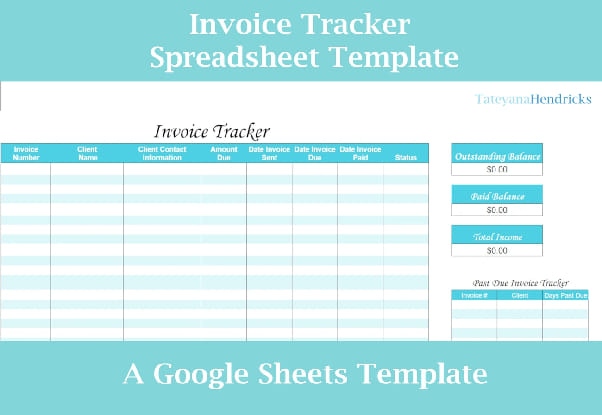
Image Source: Etsy
The right invoice tracker can reshape your financial management process. Here are the best free options for 2026, starting with the tool built for contractors and field crews:
1. QuickAdmin: free invoice tracker for contractors
QuickAdmin combines invoice creation and invoice number tracking in one account. Send invoices from your phone, see payment status, and follow up without copying rows into a spreadsheet.
Best for: contractors, landscapers, plumbers, and small field crews who need mobile invoicing plus tracking.
What the Free plan includes (verified against current pricing):
- Up to 3 invoices per month and 6 estimates per month
- Invoice and estimate status tracking
- Unlimited clients, 1 user, 2 jobs
- AI-powered invoice generator with voice dictation
- Progressive Web App; install on iOS/Android without a separate “invoice tracker app” store listing
What is not on Free: automatic overdue reminders, unlimited invoices, and integrated online payments are on Basic and higher plans. Status tracking still works on Free within the monthly invoice limit.
Create a free invoice → · Start tracking (Free account) → · See pricing
Invoice tracker app on mobile
If you searched for an invoice tracker app, you usually want the same list on your phone: open invoices, due dates, and balances. QuickAdmin runs as a PWA; add it to your home screen and use the invoices list from the field. Limits of the Free plan still apply (3 invoices/month). For unlimited invoices and automatic reminders, upgrade when volume grows.
2. Order.co Invoice Tracker Template
Order.co’s free invoice tracker template shines with its simplicity and functionality. This Excel-based tracker shows your financial data in multiple ways through an invoice overview tab where you enter individual invoice details. The template has two specialized pivot charts: monthly invoice totals and spend totals by category. These charts update automatically when you refresh the data and give you immediate visual insights into spending patterns. You need to enter invoice date, total amount, remaining amount, and category for accurate calculations. This makes it perfect for businesses that need simple but effective tracking capabilities.
3. Zoho Invoice Template
Zoho’s invoice tracker excels with exceptional customization options. You can match invoices to your brand by adding logos, signatures, custom font colors, and bank details. The multi-language support lets businesses send invoices in their customers’ preferred languages. This builds stronger customer relationships through clearer communication. The template handles tax calculations and compliance requirements automatically. Zoho lets you assign different invoice templates to specific clients based on their needs. This works great for businesses serving customers of all types.
4. Invoice Ninja Tracker
Invoice Ninja’s forever-free plan supports up to five clients with unlimited invoices. The tracker has four professional templates, custom branding options, and online payment capabilities. The best features are automated payment reminders and recurring invoice functionality. Freelancers or startups with fewer than 20 clients will find great value in its accessible interface and simplified processes. Digital invoice creation lets you send them from any device and accept direct client payments.
5. Wave Invoice Tracker
Wave’s free invoice tracker helps you save time and manage customer information better. The platform connects invoicing directly with accounting features to create a seamless financial management experience. The central dashboard lets you track payments and communications, view customer history, and prioritize actions based on payment status. The tracker has professional templates with drag-and-drop customization for brand personalization. Wave’s mobile app for iOS and Android creates invoices anywhere and sends immediate notifications when invoices are viewed, become due, or get paid.
6. Square Invoices
Square’s customizable invoice templates line up with your business identity. Default templates automatically fill in invoice information to save time on repetitive tasks. Square Invoices lets you send unlimited invoices, estimates, and contracts without monthly fees. The system works with various payment methods including credit cards, Google Pay, Apple Pay, and Cash App Pay. Businesses can streamline billing processes with automated payment reminders and real-time tracking through their online dashboard.
7. Refrens Invoice Tracker
Refrens is a 150,000-business strong invoice tracker used in 178+ countries. This detailed platform handles GST-compliant invoices and tracks payments efficiently. ISO/IEC 27001:2022 certification ensures your data stays private and secure. Beyond standard tracking, Refrens offers recurring invoice functionality and multi-currency support. Android and iOS mobile apps create, share, and track invoices on the go. The platform maintains 99% uptime; one of the industry’s best rates.
8. Invoice Temple
Invoice Temple completes our list with its small business-friendly approach. The free plan allows five invoices monthly, perfect for businesses with minimal invoicing needs. The free tier includes premium templates and 24/7 support. You can customize invoices with logos and branding elements without Invoice Temple branding on documents.
How to use an invoice tracker template effectively
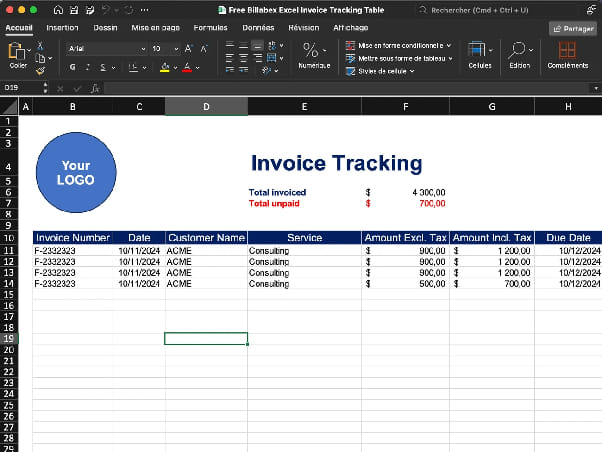
Image Source: Billabex
You need more than just a template to become skilled at tracking invoices; you’ll need a good setup and regular maintenance. A well-organized system from day one will help prevent late payments and make your finances easier to manage throughout the year.
Setting up your invoice tracking spreadsheet
Your functional invoice tracker starts with the right column structure. Match the CSV template on this page (columns A–J):
- A – Invoice Number: unique ID (example
INV-00482) - B – Date Issued: when you sent the invoice
- C – Client Name: who received the invoice
- D – Project / Job: job or site name (keeps deposits and finals together)
- E – Due Date: when payment is expected
- F – Invoice Amount: total billed
- G – Amount Paid: what has been received
- H – Balance Due: what is still owed
- I – Status: Sent, Partially Paid, Overdue, Paid, etc.
- J – Notes: follow-up reminders
The downloaded CSV stores values, not live formulas. After you open it in Excel or Google Sheets, add:
- Balance due (row 2):
=F2-G2(copy down the column) - Days overdue (optional, row 2):
=IF(OR(I2="Paid",I2=""),"-",IF(ISBLANK(E2),"-",IF((TODAY()-E2)>0,TODAY()-E2,"-")))
That overdue formula uses E for due date and I for status (not column D; D is Project / Job in this template).
You can boost visibility by adding filters to each column with the filter icon. This lets you sort invoices by client, status, or date quickly.
Tracking due dates and payment status
Good payment tracking means keeping a close eye on due dates and payment statuses. Pick specific times each week to review your accounts receivable. Look for upcoming payments, spot overdue invoices, and plan your follow-ups [8].
Automatic tracking becomes easier with conditional formatting that highlights overdue invoices in red and approaching due dates in yellow. This visual approach helps you focus on collecting payments where they matter most [9].
Aging reports give you a clear picture of outstanding invoices by time periods. These reports group payments that are 30, 60, or 90+ days late, so you can tackle problem accounts first [10]. Most free invoice tracker templates can generate these reports automatically.
Using pivot tables for monthly summaries
Pivot tables turn your raw invoice data into useful insights without complex technical knowledge. Select your entire dataset with headers and click Insert > PivotTable to create one [11].
Creating a monthly revenue summary is straightforward. Drag “Date” to Rows (grouped by month), “Status” to Columns, and “Amount” to Values. Excel calculates totals and shows paid versus outstanding amounts for each period [11].
Your pivot table adapts to different needs. Right-click any value, select “Value Field Settings,” and pick options like Sum, Count, or Percentage. This lets you analyze invoice data in different ways, such as paid invoice percentages by client or average payment times [11].
Make trends easier to spot by creating a pivot chart from your pivot table data. This shows clear visual patterns in monthly invoice totals or outstanding client payments [12].
Sharing with your team or accountant
Team collaboration is key in modern invoice tracking, especially with remote teams. Google Sheets makes sharing simple; just click “Share” and add team members’ email addresses with the right permissions (view, comment, or edit) [13].
OneDrive offers real-time collaboration for Excel users. Everyone works on the latest version of your invoice tracker this way [13].
Your accountant will appreciate exported views that match their specific needs. Most templates let you create filtered views for certain date ranges or transaction types. This focused approach makes financial reviews quick and clear [14].
Keep your data safe by password-protecting your spreadsheet or limiting access to specific sections through sheet protection. These basic security steps maintain data accuracy while supporting team collaboration.
Download the free tracker template → · Start tracking in QuickAdmin →
Invoice number tracker: look up any bill fast
An invoice number tracker exists so you can answer “what’s the status of INV-00482?” without opening ten emails.
Rules that keep numbers usable:
- Assign a unique number the moment you create the invoice (software does this automatically).
- Put the number in the email subject and the first line of any follow-up.
- Store the same number in your spreadsheet or QuickAdmin invoices list.
- Never reuse a number, even if an invoice is voided; mark it void and keep the history.
If you still need to create the document, open the free invoice generator, then log the number here or in QuickAdmin.
Invoice status tracker: sent, viewed, overdue, paid
An invoice status tracker (or invoice status list) should show at least these states:
| Status | Meaning | Next action |
|---|---|---|
| Sent | Delivered to the client | Wait for due date or first follow-up |
| Viewed | Client opened the invoice (when the tool supports it) | Soft reminder if due soon |
| Partially paid | Deposit or progress payment received | Track remaining balance |
| Overdue | Past due date with balance remaining | Follow up by invoice number |
| Paid | Balance is $0 | Archive; confirm project balance is closed |
Track invoice status weekly. Fifteen minutes every Monday beats a month of “I thought they paid.”
Invoice payment tracker and unpaid invoice tracker
An invoice payment tracker records amount billed, amount paid, and balance due on every row. An unpaid invoice tracker is simply the filtered view of that list where balance > $0.
Best way to track unpaid invoices
The best unpaid invoice tracker is the one you actually open every week. Use this simple system:
- One list for every open invoice; number, client, amount, due date, amount paid, and balance.
- Status labels that match reality; sent, viewed, partially paid, overdue, paid.
- A weekly aging review; group invoices at 0–30, 31–60, and 60+ days past due.
- Follow up by invoice number; clients respond faster when you reference the exact bill.
- Create in the tool that matches the job; use the free invoice generator for a one-off document, or a QuickAdmin Free account when you want status tracking after send.
- Keep project balances visible; deposits and progress bills under one job name so the remaining total is obvious.
If you only remember who owes you “something,” you will miss cash. An invoice payment tracker turns memory into a checklist.
When to switch from templates to software
Invoice tracker templates work great for small businesses starting out. However, businesses need to upgrade to dedicated software at some point. Early recognition of these signs can save countless hours and prevent errors that get pricey.
Signs your business has outgrown spreadsheets
Frequent errors in your invoice tracking spreadsheet tell you it’s time to switch. Research shows one in ten invoices has some type of error. Businesses miss half of these mistakes before processing payments [15].
The time spent on manual updates gives you another clear signal. Your spreadsheets shouldn’t feel like a full-time job that eats into lunch breaks - that’s a red flag [16]. Teams lose productivity when they spend 60% to 80% of their time searching for data.
The third warning sign shows up in collaboration problems. Your team has outgrown simple templates when they keep asking “Who has the latest version?” or name files like “Inventory_FINAL_v6_ReallyFinal.xlsx” [17].
Benefits of online invoice trackers
Online invoice software creates invoices automatically after a single data entry. The system remembers this information and speeds up future invoice creation [18]. Modern solutions send invoices through email and track payment status.
Integration capabilities are a vital advantage. Quality invoice software combines smoothly with accounting and CRM systems. This ensures data flows without duplicate manual entries [19].
More importantly, advanced solutions provide analytics and reporting features you won’t find in invoice tracker templates. These tools help you monitor outstanding payments, track on-time payments, and create financial reports with ease [19].
Top free software alternatives to templates
Zoho Invoice leads the pack with its forever-free plan that offers excellent customization options and multi-language support [1]. Users can create professional invoices while automating payment reminders.
Wave provides a resilient alternative that connects invoicing directly with accounting features for natural financial management [6]. Its mobile app lets you create invoices anywhere with up-to-the-minute notifications.
Square Invoices lets you send unlimited invoices without monthly fees. You can accept various payment methods including credit cards, Google Pay, and Apple Pay [1].
Invoice Ninja rounds out our list with its forever-free plan. The plan supports up to five clients with no limits on sent invoices [1].
For contractors who need job-based tracking from the field, QuickAdmin combines invoicing and status tracking in one account (Free plan available with monthly invoice limits); no spreadsheet required for status once the invoice is sent from that account.
Choosing the right tool for your business
You need a full picture of your business needs to pick the right invoice tracker. The best tool should line up with your workflow, team size, and financial processes to improve payment times.
Freelancers vs. small teams
Freelancers do well with simplified processes like Harvest. This tool provides time tracking and professional invoicing at USD 12.00 monthly per user [20]. Solo practitioners need simple and affordable tools. Toggl Track or My Hours work great as starting points [21].
Small teams need more shared features. Freshbooks works well for businesses that need complete accounting and invoicing capabilities [22]. Invoicera helps growing teams with resilient infrastructure for staff management. Teams can subcontract work, allocate projects, and assign tasks to members [22].
Time tracking needs
Businesses that bill by the hour must have accurate time tracking integration. Companies might undercharge clients without proper tracking; a common issue with manual methods [21]. The best tools convert tracked hours into invoice items automatically.
Zoho Invoice lets users “run the timer as you work” on mobile and desktop platforms. This captures every minute you can bill [23]. Harvest turns tracked time into reports or invoices with two clicks [20].
Recurring billing and automation
Automated recurring billing offers more than just convenience. Case studies show that businesses using automated billing can recover 1%-5% of recurring revenue through automated dunning features [3]. One company saved 40 work hours and USD 2,000 in monthly revenue through automation [3].
Many tools offer “set it and forget it” features. These generate invoices, send reminders, and update payment status automatically [3].
Integration with payment gateways
Payment gateway integration helps you collect payments faster and improves cash flow. Zoho Invoice connects with major gateways like Stripe, PayPal, Square, Authorize.net, and others [2].
Transaction fees vary by a lot: Stripe charges 2.9% plus 30¢ per transaction, while PayPal costs 2.5% plus a fixed fee [2]. These integrations add payment links to invoices. Clients can pay late invoices right away [24].
International businesses should look for multi-currency support and compliance with regional tax rules. This makes cross-border transactions easier [25].
Conclusion
Small businesses can access useful financial tracking through free invoice tracker templates without paying premium prices. Spreadsheets handle the basics; online tools add live status lists and, on paid plans, automated reminders. A structured invoice tracking system can help small business owners deal with late payments that negatively affect 73% of businesses.
The right template choice depends on your business needs. Simple and affordable solutions work best for freelancers. Small teams need shared features and time tracking capabilities. Most businesses begin with simple Excel or Google Sheets templates and move to advanced options as they grow.
Any invoice tracking system needs regular upkeep. Weekly reviews of payment status, due dates, and collection priorities prevent cash flow issues. Pivot tables help turn raw invoice data into analytical insights without needing advanced technical skills.
Your business will show signs when it has outgrown spreadsheet tracking. These signs include frequent errors, too much time spent on manual updates, and problems with collaboration. Specialized software with automation becomes essential at this stage.
Invoice management keeps changing as remote work and digital payments expand. Quick adaptation to these changes gives small businesses major advantages through better cash flow management, less administrative work, and stronger client relationships. Whatever solution you pick, a structured invoice tracking system is vital for financial stability and business growth.
Create the document with our free invoice generator: Free Invoice Generator · Track status in-app: QuickAdmin Free
FAQ about invoice tracking
Q1. How do I track invoice numbers online for free? Sign up for a free online invoice tracker like QuickAdmin that assigns invoice numbers automatically and shows payment status. Send an invoice, then open the invoices list and search by number; no Excel required. The Free plan includes up to 3 invoices per month.
Q2. What is the best free invoice tracker for small business? For contractors and field crews, QuickAdmin offers free invoice creation and status tracking with mobile PWA access. Automatic overdue reminders are on paid plans. Freelancers may also use Wave or Zoho Invoice. Spreadsheet templates (download ours above) work for very low volume.
Q3. What’s the difference between an invoice tracker and an invoice generator? An invoice generator creates and sends invoices. An invoice tracker shows what is sent, due, overdue, partially paid, and paid. QuickAdmin combines both so you create, send, and track in one place.
Q4. How do I look up an existing invoice by number? You need the invoice number (for example INV-00482), or the client name and approximate date. In QuickAdmin, open Sales → Invoices and search by that number. In a spreadsheet, filter the Invoice Number column.
Q5. When should I switch from a spreadsheet to an online invoice tracker? Switch when you notice frequent errors, spend hours on manual updates, lose track of invoice numbers, or miss follow-ups. Online trackers eliminate duplicate data entry and give you one live list of outstanding payments.
Q6. How can I track invoice numbers without Excel? Use a free online invoice tracker that auto-assigns numbers and keeps status in one list. QuickAdmin works as a Progressive Web App on any phone → create, send, and track from the field without formulas.
Q7. What is the best way to track unpaid invoices? Keep every invoice in one status list with amount paid and balance due, review overdue balances weekly, and follow up by invoice number. Track deposits and progress bills under the same project so the remaining balance stays visible.
References
[1] - https://zapier.com/blog/best-free-invoice-software/
[2] - https://www.zoho.com/us/invoice/help/online-payments/
[3] - https://staxbill.com/how-to-automated-recurring-billing/
[4] - https://www.invoiceonline.com/business-newsletter/entrepreneurship/adapting-invoicing-software-for-remote-entrepreneurship-in-2025
[5] - https://stripe.com/us/resources/more/invoice-software-for-small-businesses-a-guide-to-get-started
[6] - https://www.waveapps.com/invoicing
[7] - https://fitsmallbusiness.com/how-to-keep-track-of-invoices-and-payments/
[8] - https://www.brex.com/spend-trends/accounting/how-to-keep-track-of-invoices-and-payments
[9] - https://www.hubifi.com/blog/tracking-invoices-guide
[10] - https://www.bill.com/blog/how-to-keep-track-of-invoices
[11] - https://support.microsoft.com/en-us/office/create-a-pivottable-to-analyze-worksheet-data-a9a84538-bfe9-40a9-a8e9-f99134456576
[12] - https://www.thebricks.com/resources/how-to-create-an-invoice-tracker-in-excel
[13] - https://www.thebricks.com/resources/how-to-create-an-invoice-tracker-in-spreadsheets
[14] - https://help.tradifyhq.com/hc/en-us/articles/21831225509913-Using-Spreadsheet-Pivot-tables-to-create-a-Invoice-summary
[15] - https://enty.io/blog/invoicing-software-vs-invoicing-templates
[16] - https://www.doola.com/blog/7-signs-youve-outgrown-your-spreadsheets-and-need-a-real-business-analytics-tool/
[17] - https://www.prialto.com/blog/5-signs-your-business-has-outgrown-spreadsheets-and-should-use-crm-best-practices
[18] - https://bestreviews.net/moving-from-invoice-templates-to-online-invoices/
[19] - https://www.invoiceonline.com/business-newsletter/finance-and-accounting/why-customizable-invoice-software-beats-templates-in-word-and-excel
[20] - https://www.getharvest.com/
[21] - https://www.hirebasis.com/blog/time-tracking-tools-for-freelancers-and-remote-teams
[22] - https://www.evercast.us/blog/top-invoicing-tools-for-freelancers
[23] - https://www.zoho.com/us/invoice/time-tracking/
[24] - https://lawbillity.com/invoice-tracker/
[25] - https://recurly.com/product/recurring-billing/