
Construction Change Order Template 2026
Free construction change order template for contractors: document scope, labor, materials, markup, schedule impact, approvals → then invoice the approved work.
by Eng. José Manuel Siso Colmenares • 9/21/2026 · Updated: 9/21/2026

Construction Change Order Template 2026
Updated: Sep 21, 2026.
You started with a clean estimate. Then demolition uncovered damaged framing, the owner upgraded tile, and the inspector asked for one more correction. The crew already knows the work changed. The paperwork has not; and that gap is where contractors quietly give away profit.
This guide gives you a construction change order template you can copy today, a worked pricing example, and a live QuickAdmin Premium walkthrough (with screenshots) so approved extras become billed revenue; not a late-night argument over texts.
💡 Quick answer: A construction change order is a written amendment that records what changed, why it changed, what it costs, how it affects the schedule, and who approved it. A useful template also shows the original contract value, previous approved changes, the current adjustment, and the revised total.
What this guide covers:
- Why verbal “go ahead” approvals cost money
- Fields every practical change order should include
- A free copy-paste construction change order template
- A remodel example with labor, materials, markup vs margin
- How QuickAdmin Premium connects change orders → invoices
- Common mistakes and short clauses you can reuse
Why change orders protect more than the price
Change orders are normal. Autodesk’s construction change order guidance treats them as the legal record of agreed changed work and its price. Autodesk Construction AIA’s G701 instructions describe a change order as the document used to implement changes agreed by owner, contractor, and architect; including adjustments to contract sum and contract time. AIA G701 instructions
A client may say:
Yes, go ahead and fix it.
Three weeks later the same client asks:
Why is this extra on the invoice?
Every solid change order answers five questions before work starts:
- What changed?
- Why is it outside the original scope?
- What does it cost (labor, materials, markup)?
- What does it do to the schedule?
- Who approved it in writing?
If any answer is missing, the invoice becomes a dispute.
The Change Order Profit Bridge
Many PDF templates stop at the signature. Contractors need one more step: did the approved change become profitable, billable work?
Original estimate
→ Change event
→ Approved change order
→ Purchase / sub cost (when needed)
→ Invoice
→ Actual job cost
That bridge is what QuickAdmin Premium is built to keep connected: job → change order → invoice → job costs; instead of scattering extras across notes, emails, and memory.
What causes construction change orders?
Common triggers:
| Cause | Typical example |
|---|---|
| Owner request | Upgrade finishes, add outlets, move a wall |
| Hidden conditions | Rotted framing, bad soil, damaged wiring after demo |
| Drawing conflicts | Plan dimensions or finish schedules do not match field |
| Material substitution | Discontinued product, long lead time, code requirement |
| Code / inspector | Extra fire stopping, accessibility, permit revision |
Price the change, state the schedule effect, and get approval before the crew starts; whenever the contract allows.
What a construction change order template should include
AIA G701-style thinking asks you to show original contract sum, previously authorized changes, the current adjustment, and the new contract sum. AIA G701 For day-to-day contractor work, include:
Project identification
Project name, address, owner/client, contractor, architect/engineer if any, original contract number and date, job number.
Change order identification
Change order number (CO 001, CO 002…), date, requested by, related RFI/drawing/field report, approval deadline, status.
Avoid vague titles like “Extra work final revised.” Use numbers your invoice can reference.
Clear reason and scope
Weak:
Additional plumbingStronger:
During demolition, existing cast iron drain routing conflicted with the approved path.
This change covers relocation of ~42 LF of sanitary drain, fittings, trenching, backfill, testing, and cleanup.
Excludes hazardous material remediation and structural redesign.
Cost breakdown
Labor, materials, equipment, subcontractors, permits/fees, overhead, markup/profit, tax if applicable, and the current change order amount.
Schedule impact
State one of these clearly:
Schedule impact: None.or:
Contract time increase: 2 calendar days.
Revised substantial completion date: October 3, 2026.
The three-number rule
- Contract value before this change
- Amount of this change
- New contract value after this change
Free construction change order template (copy and use)
CONSTRUCTION CHANGE ORDER

PROJECT INFORMATION
Project:
Project address:
Owner / Client:
Contractor:
Architect / Engineer:
Original contract number:
Original contract date:
Job number:

CHANGE ORDER INFORMATION
Change Order No.:
Date:
Requested by:
Related RFI / Drawing / Field Report:
Approval deadline:
Status: (Potential / Pricing / Submitted / Approved / Invoiced / Paid)

REASON FOR CHANGE
(What happened, why it is outside original scope, what work is required)

CHANGE IN SCOPE
Original scope:
Added / deleted / substituted work:
Exclusions:

COST BREAKDOWN
Labor:
Materials:
Equipment:
Subcontractors:
Permits / Fees:
Subtotal:
Markup / Overhead & profit:
Tax (if applicable):
CURRENT CHANGE ORDER AMOUNT:

CONTRACT VALUE
Original contract amount:
Previously approved change orders:
Contract amount before this change:
Current change order (+ / -):
NEW CONTRACT AMOUNT:

SCHEDULE IMPACT
Days added / removed:
Revised completion date:
Notes:

SUPPORTING DOCUMENTS
Photos / drawings / quotes / RFIs / inspection notes:

APPROVAL
Owner / Client / Signature / Date
Contractor / Signature / Date
Architect / Engineer (if required) / Signature / Date
Extractable rule: On one page, a usable change order answers four questions: What changed? What does it cost? What does it do to the schedule? Who approved it?
Worked example: Unit 204 porcelain tile upgrade
Job: Elite Renovations remodel for Golden Gate Homes
Change: Owner upgrades from standard tile to porcelain after selections
CO: CO 001 | Porcelain tile upgrade | Unit 204 remodel
| Item | Qty | Rate (cost) | Markup | Amount |
|---|---|---|---|---|
| Porcelain tile upgrade labor | 12 hr | $85 | 15% | $1,173.00 |
| Upgraded porcelain tile materials (differential) | 180 SF | $8.50 | 15% | $1,759.50 |
| Change order total | $2,932.50 |
Markup vs margin (same numbers, different math)
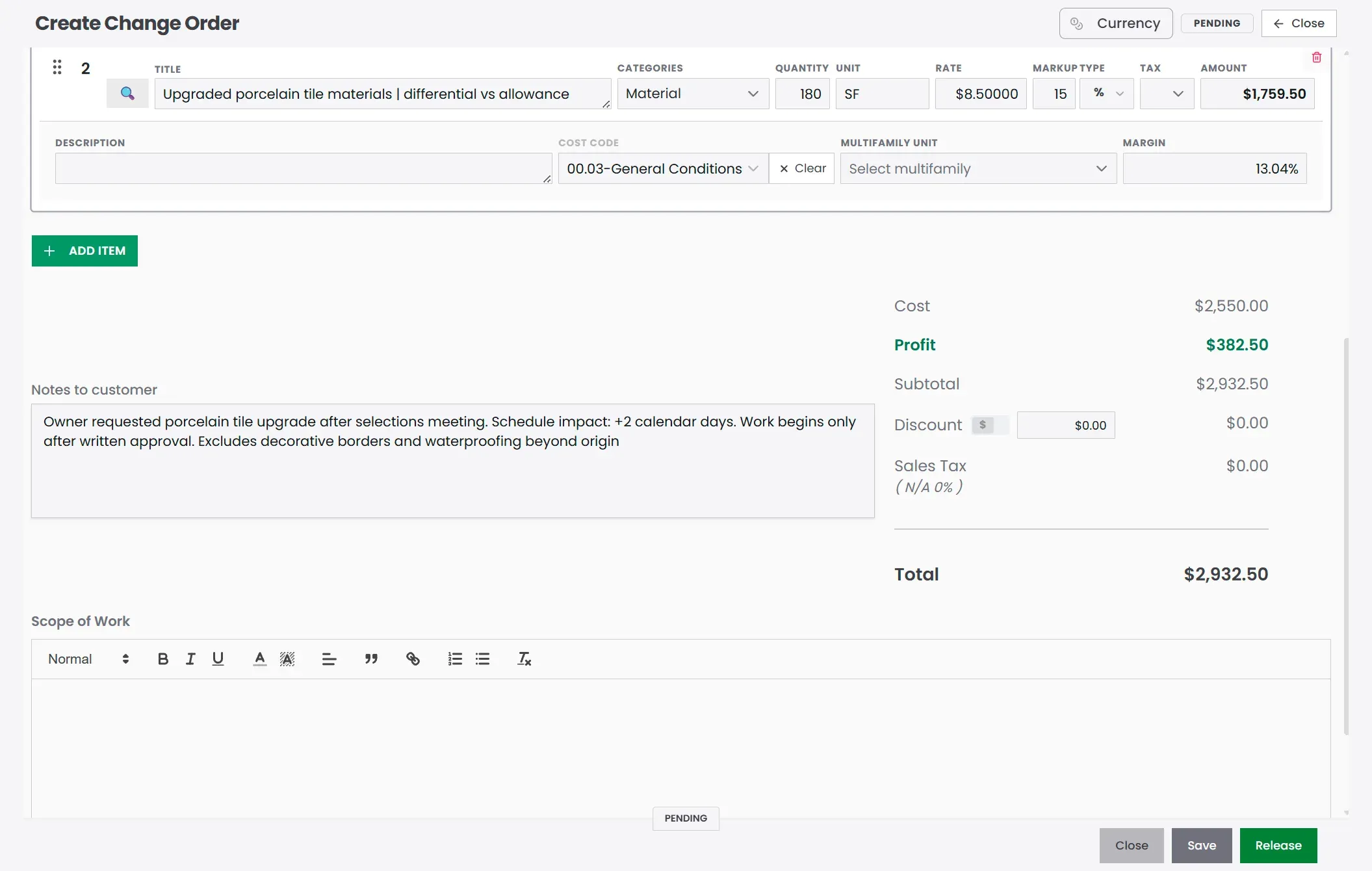
QuickAdmin shows both. On this demo line, 15% markup produces about a 13% margin.
Markup = profit ÷ cost
$382.50 ÷ $2,550.00 ≈ 15%

Margin = profit ÷ selling price
$382.50 ÷ $2,932.50 ≈ 13%
Do not quote “15% margin” when you meant “15% markup.” Clients and your own job-cost report will disagree.
Revised contract value
Assume:
Original contract:              $48,500
Previous approved changes:           $0
This CO 001:                    $2,932.50
Revised contract value:        $51,432.50
Schedule note used on the demo
Owner requested porcelain tile upgrade after selections meeting.
Schedule impact: +2 calendar days.
Work begins only after written approval.
Excludes decorative borders and waterproofing beyond original scope.
How to create a change order in QuickAdmin (Premium)
Change orders, purchase orders, and job bills sit on QuickAdmin Premium. Free and Basic help you estimate and invoice within plan limits; Premium is the upgrade when extras, vendor costs, and job profit need to stay on one job record.
Step 1: Open Change Orders under Sales
In the app go to Sales → Change Orders. Filter by job so every CO stays attached to the right project.
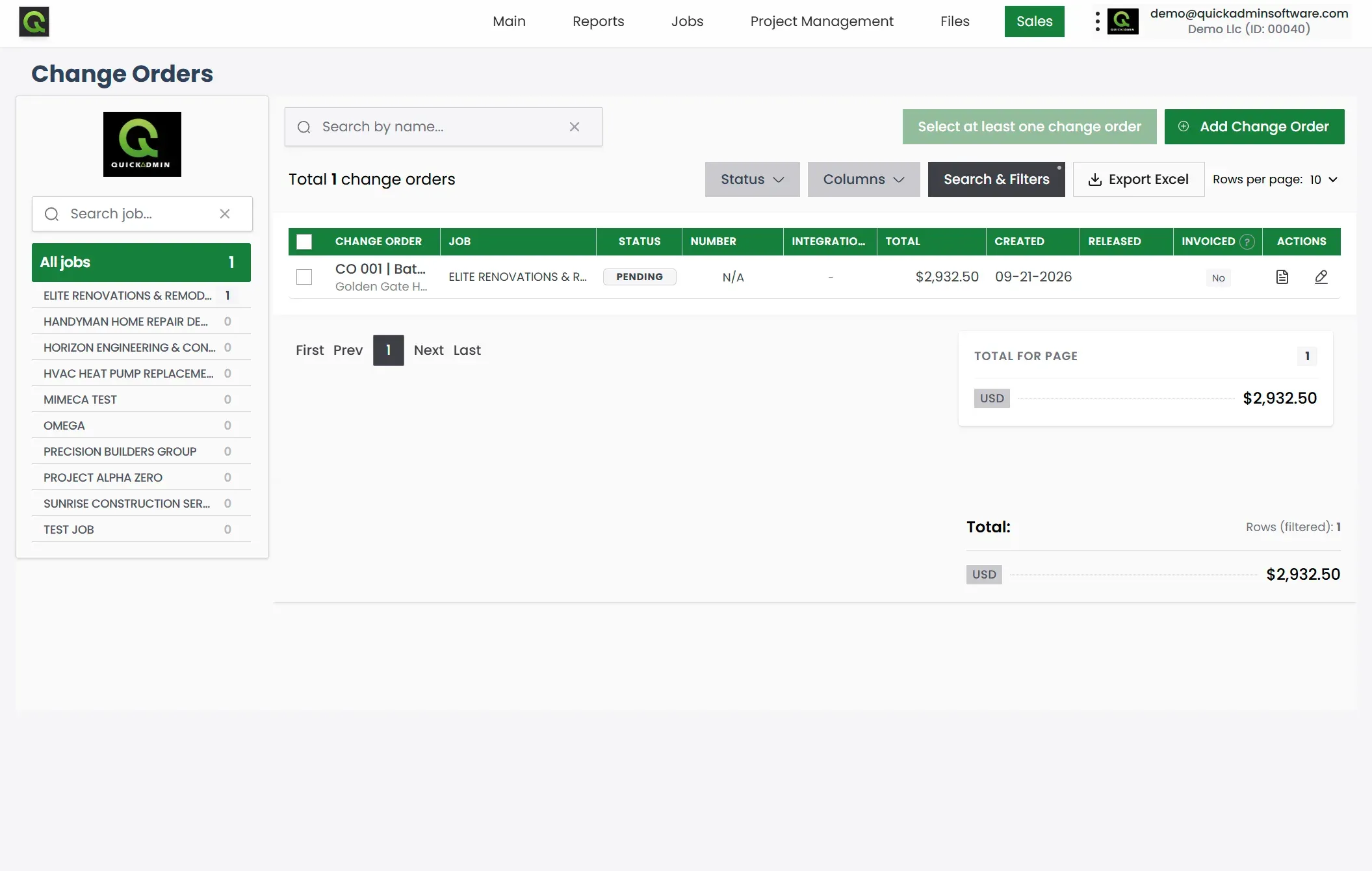
In the demo, CO 001 for Elite Renovations shows status Pending, total $2,932.50, and Invoiced: No; exactly the stage before client approval and billing.
Step 2: Create the change order inside the job
Click Add Change Order, pick the job (customer and billing address fill in), and give it a clear title with a CO number.
Add line items for labor and materials. Set quantity, unit, rate, and markup. QuickAdmin calculates amount, cost, profit, and margin so you can see whether the change is worth doing before you send it.
Step 3: Preview the client PDF
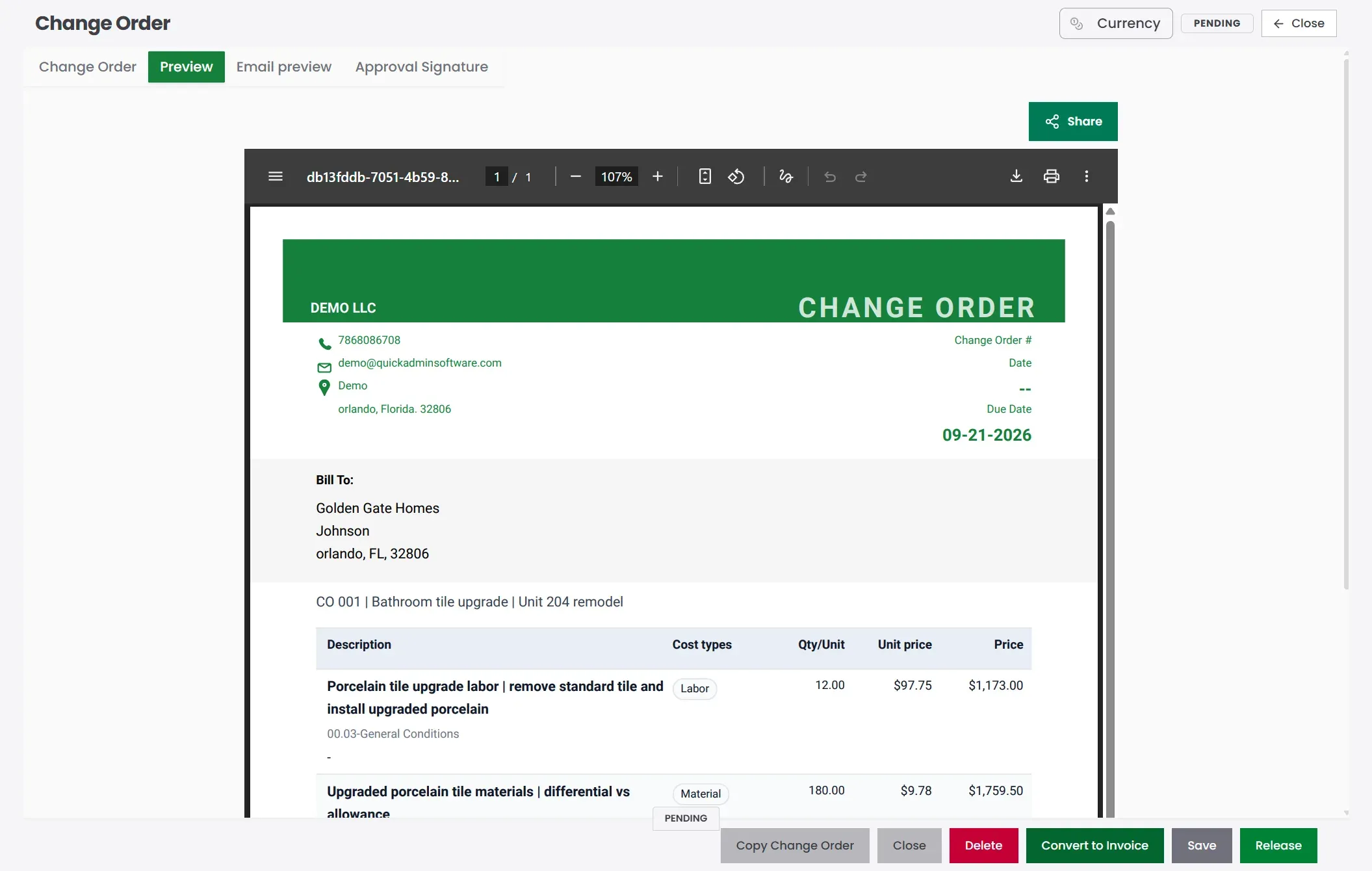
Use the Preview tab. Check company details, Bill To, due date, line descriptions, and total before you release or share.
Step 4: Release, get approval, convert to invoice
- Save the draft.
- Release when it is ready for the client.
- Collect written approval (signature workflow when you use it).
- Convert the approved change order to an invoice; or add it as a clear line on a progress invoice.
- Track payment; keep the CO number on the invoice so nobody asks “what is this extra?”
Never invoice a pending change as if it were approved.
For the full progress-billing layout (original scope + approved COs + retainage), see General Contractor Invoice Template with Change Orders.
Change order request vs approved change order
| Stage | Meaning | Safe to bill? |
|---|---|---|
| Potential / Pricing | Still estimating | No |
| Submitted | Waiting on client | No |
| Approved | Contract adjusted | Yes, after work (or per contract) |
| Invoiced / Paid | Money side closed | Already billed |
A simple status path:
Potential → Pricing → Submitted → Approved → Invoiced → PaidApproval is not cleanup. It is the project control point.
Common mistakes that turn extras into unpaid work
- Verbal approval only → No number, no signature, no schedule note.
- Vague scope → “Additional tile” without SF, labor hours, or exclusions.
- Mixing markup and margin → 15% markup ≠ 15% margin.
- Ignoring schedule → Correct price, wrong completion date, liquidated damages risk.
- Invoicing before approval → Fast way to damage trust.
- Losing the CO number on the invoice → Client cannot match the extra to the signed change.
- Doing the work first, paperwork later → Memory is not a job cost system.
Short clauses you can reuse
Approval clause
By signing, the client approves the scope, cost, and schedule impact listed in this change order.
Work described here begins only after written approval.
Pending changes clause
Pending change requests are not included in the current invoice unless listed as approved change orders.Hidden conditions clause
Hidden or unforeseen conditions discovered after work begins may require a written change order before additional work proceeds.These are practical examples, not legal advice. For lien rights, retainage, and state notice rules, check with a qualified professional.
Related guides
- Estimate Software for Contractors (Premium job costing)
- General Contractor Invoice Template with Change Orders
- Purchase Order Software for Contractors
- Job Costing Software for Small Contractors
- How to Make an Invoice
- Free Invoice Tracker
Conclusion
A construction change order template is how you turn “while you’re here…” into documented, approved, billable work. Copy the fields above, price labor and materials with clear markup, write the schedule impact, and get the signature before the crew starts whenever you can.
On QuickAdmin Premium, that same change order lives on the job: list it, price it, preview the PDF, release it, then convert it to an invoice without retyping the story.
Create your free QuickAdmin account to start estimating and invoicing; upgrade to Premium when you need change orders, purchase orders, and job cost tracking on the same project.
FAQ
What is a construction change order?
A construction change order is a written amendment that documents an agreed change to the original project scope, contract price, contract time, or a combination of those items after the original contract is in place.
What should a construction change order template include?
Include project and contract references, change order number, reason for the change, detailed scope, labor, materials, equipment, subcontractors, markup, schedule impact, original and revised contract value, attachments, and approval signatures.
Should a contractor start change order work before approval?
Whenever your contract allows, document and get approval before starting extra work. Emergencies still need immediate written documentation according to the contract.
How do you calculate the revised contract amount after a change order?
Start with the original contract amount, add or subtract previously approved change orders, then add or subtract the current approved change order. The result is the revised contract amount.
What is the difference between a change order and an invoice?
A change order modifies the agreed scope, price, or schedule. An invoice requests payment for work already covered by the contract and approved changes.
Can QuickAdmin create construction change orders?
Yes. Change orders are part of QuickAdmin Premium. You can create them inside a job, price labor and materials with markup, preview a client PDF, release for approval, and convert an approved change order into an invoice.
Does a change order need to show schedule impact?
Yes, when the change affects project duration or a contractual completion date. State the days added or removed and the revised completion date when it applies.
What is the difference between markup and margin on a change order?
Markup is the percent added on top of cost. Margin is profit as a percent of the selling price. A 15% markup is about a 13% margin; they are not the same number.